If you run performance marketing campaigns, there is one obstacle that you must have observed quite often: the numbers might not add up. Say, your Facebook shows you got 500 conversions, the analytics tool shows 350, and the finance team’s data shows something completely different.
This leads to an increase in ad spend, with the data not justifying that spend. This makes the data less reliable every quarter.
What causes these hindrances are –
- Ad blockers
- Browser privacy updates
- Slow death of third-party cookies
The old way of tracking users, through JavaScript firing in the browser, is less relevant and is slowly breaking down.
Case studies demonstrate that implementing a stable server-to-server connection reduces overall platform CPA volatility and can even lower the target acquisition costs by 30% to 60% within 90 days by properly training automated bid caps.
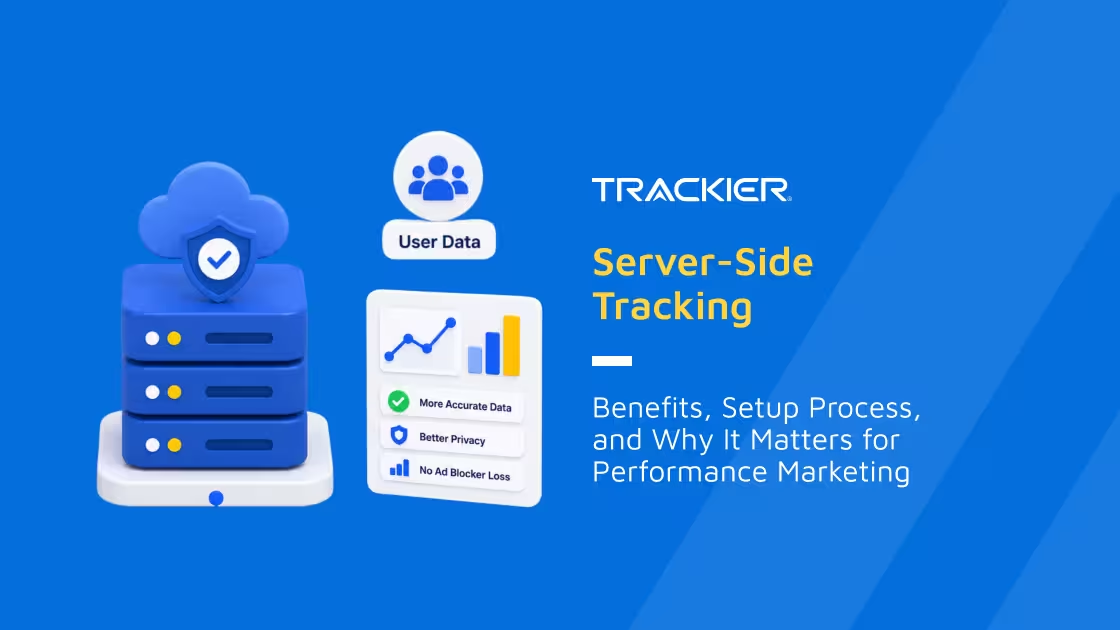
Server-side tracking is the way marketers are using it to fix this. It is now, in fact, becoming the standard way to collect reliable data in a privacy-first environment. This article aims to emphasise what it is, how it is set up, and most importantly, why it matters.
What is Server-Side Tracking?
Server-side tracking is a method of collecting user data like –
- Clicks
- Conversions
- Page views
- Purchases
through a server instead of relying entirely on scripts running in the visitor’s browser.
In the traditional, that is the client-side form of tracking, some pixels and tags are set on the website. They are fired directly from the user’s browser to platforms like Google, Meta, or TikTok.
With server-side tracking, on the other hand, the same events go to the platform’s server first. That server –
- Processes it
- Cleans it
- Forwards it to the ads platform and analytics tools
It is as if the server is the checkpoint between the website and the outside world. Nothing leaves until the marketer decides it should and it is the marketer itself who decides what data gets shared.
Why is Client Side Tracking Struggling?
To understand the importance of the new tracking model, it is necessary to first understand what the old tracking model lacks.
Ad Blockers are Stopping the Pixels Before They Fire
42.7% of the global internet uses ad blockers, and their purpose is not just to hide banners but to block tracking scripts placed on pages. This shows that a major part of conversion is never recorded, even though transactions genuinely occurred.
Browsers are Cutting Cookie Lifespans
Safari’s “Intelligent Tracking Prevention” and Firefox’s “Enhanced Tracking Protection” limit the duration of a cookie to recognize a returning visitor. Additionally, Chrome has been rolling back support for third-party cookies.
Each change shrinks the window in which a browser-based pixel can reliably attribute an action back to a campaign.
Every Extra Script Slows the Site Down
Every additional tracking pixel means one more script for the browser to download and run before the page is actually usable. These pixels are stacked across five or six ad platforms and analytics tools, which also adds to the load time.
The cost of this does not show up right away on the tracking audit but is surely visible in the evident bounce rate.
These obstacles are caused by the client-side of tracking, which is not completely accurate and is often partial.
How Server-Side Tracking Works
Server-side tracking reroutes the path that event data takes. Instead of going straight from a browser to a dozen different third-party endpoints, it passes through a server the business or its tracking platform controls first.
Understanding the Data Journey Step-By-Step
- User takes an action on the site or app. This could be clicking an ad, signing up, or completing a purchase.
- A lightweight script on the site captures the event and sends it to a tracking server, normally hosted on a first-party domain rather than a generic third-party one.
- The server validates the event, confirms it is legitimate, and can enrich it with extra context, such as matching it against CRM records or attaching an accurate order value.
- Sensitive fields can be filtered, hashed, or stripped at this stage based on the visitor’s consent status.
- The enriched event is then routed to the relevant ad platforms, analytics tools, and internal dashboards through direct server-to-server API calls, instead of relying on a browser call that might never complete.
The Building Blocks Behind
Generally, a server-side tracking setup includes a few essential pieces –
- A hosted server – Often on cloud infrastructure like AWS or Google Cloud that receives and processes events throughout.
- A first-party domain or subdomain – Through this, the tracking requests come from the website itself instead of third-party domains that ad blockers can easily flag.
- API connections – Such connections to ad platforms replace the JavaScript pixel-to-platform connections with more direct and stable data transfers.
As the entire process runs on the infrastructure that is in the business’s control, there’s visibility and decision-making power at every stage. This is something that is not completely possible when the tracking lives entirely inside the browser.
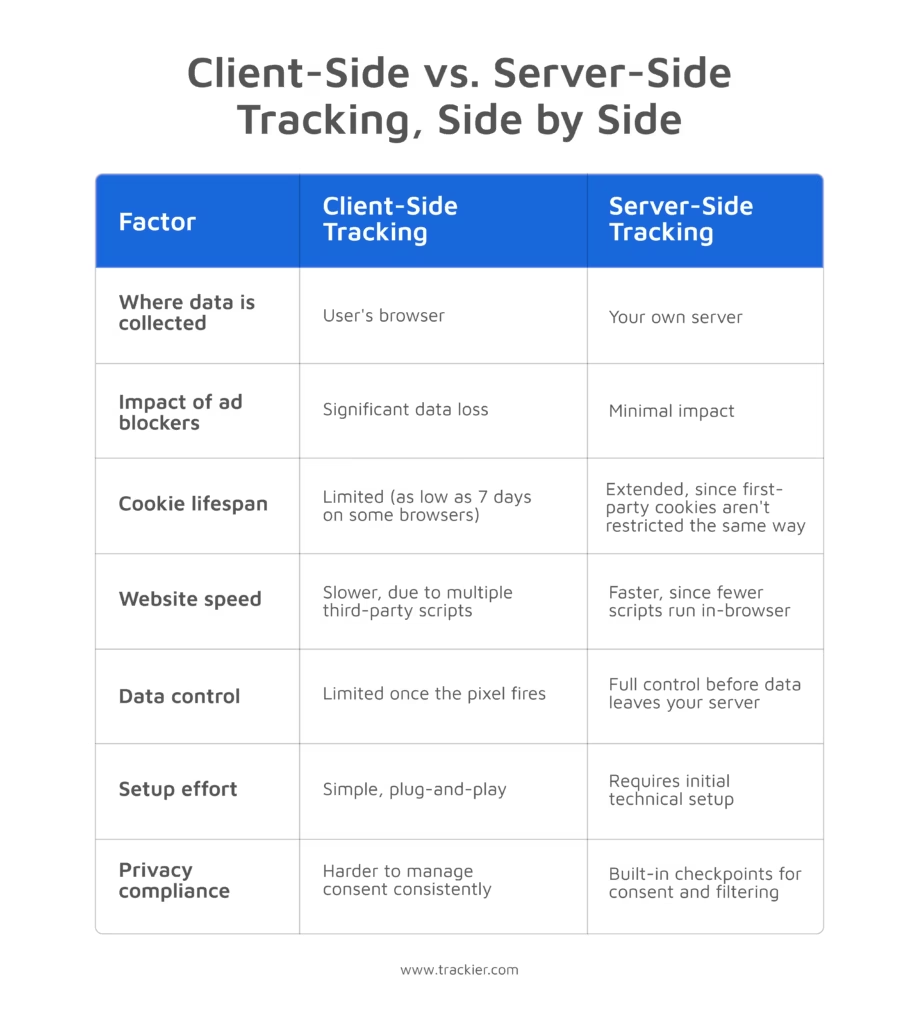
Signs a Business Actually Needs Server-Side Tracking
Not every website needs to rebuild its tracking stack overnight. A few signals tend to show the gap between client-side and reality has become expensive enough to fix.
- Data Gaps – Ad platform reports and actual CRM sales records show mismatched numbers. Browser-level restrictions cause Meta Ads Manager to underreport conversions by 30% to 40%.
- Rising Costs – Ad algorithms struggle to optimize, causing acquisition costs to rise despite stable creative assets.
- Safari Blocks – Privacy restrictions heavily impact traffic coming from Safari and privacy-focused audiences.
- Short Windows – Tracking limitations disrupt long-term retargeting and lifetime-value tracking by erasing user recognition within days.
- Slow Speed – Technical audits explicitly flag third-party tracking scripts for slowing down website load times.
Key Benefits of Server-Side Tracking for Performance Marketing
More Accurate Conversion Data
When tracking happens server-to-server, ad blockers and browser restrictions have far less ability to interfere. Businesses that switch to server-side tracking commonly recover conversions that were previously going untracked. This is sometimes a substantial percentage of total conversions.
Teams evaluating the switch watch two numbers –
- The conversion recovery rate (how many additional conversions get captured versus the old setup)
- The gap between platform-reported and CRM-reported revenue, which should shrink noticeably once server-side tracking is live.
In practical terms, reported ROAS starts to reflect what’s actually happening in the business, rather than a diluted version of it.
Stronger privacy and compliance controls
Regulations like GDPR and CCPA expect data protection to be built into a system from the start, not something that is attached later on. Server-side tracking creates a natural checkpoint for applying consent logic. For example, sending behavioral data to an internal analytics tool while withholding it from an ad platform if the visitor hasn’t opted into advertising.
Faster and Smoother Website
Moving tracking to a server takes a heavy load off a website. Instead of loading slow tracking scripts directly in a visitor’s browser, the server handles everything in the background.
This makes web pages load much faster, boosts performance scores, and gives visitors a much smoother experience.
Better Signals for Ad Platform Algorithms
Ad platforms need accurate conversion data to optimize ad campaigns. When tracking blocks cause important sales data to go missing, the algorithm optimizes using incomplete information.
Server-side tracking fixes this by sending more complete data directly to platforms through tools like Meta’s Conversions API or Google’s Enhanced Conversions. This reliable data pipeline ultimately leads to sharper targeting and better ad performance over time.
A Future-Proof Owned Data Strategy
Third-party cookies are disappearing, and browsers block tracking data more strictly with every new update. Businesses that switch to first-party, server-side data do not have to rush whenever a browser change occurs.
It is because companies own the server infrastructure, the gathered data becomes a permanent business asset rather than borrowed data from a third-party platform. Furthermore, this same data can be instantly fed into CRMs or business intelligence tools instead of just optimizing ad accounts.
Greater Data Ownership
When the data is flowing through the company’s business first, it becomes an asset of the company itself. This visibility is not something that is being rented from a third-party platform.
This data feeds the ad accounts, but also the CRM, BI tools, and even the customer support systems.
How to Set Up Server-Side Tracking: A Step-by-Step Overview
Setting up server-side tracking is not as intimidating as it may seem. In fact, its working can be broken down into a manageable list of steps that must be followed in sequence. Here is a practical outline.
Choose an Implementation Path
There are generally three routes to this, and they are –
- Utilizing a managed tracking platform like Trackier that handles the server infrastructure, deduplication, and conversion API connections through an easily understandable interface that is suitable for marketers.
- Google Tag Manager Server-Side (sGTM), which is self-hosted on a cloud provider, and offers deep customization. However, it also comes with an ongoing maintenance responsibility.
- A fully custom-built server is also an option, which is normally reserved for large enterprises with proper engineering resources.
For most affiliate teams and performance marketers, an ideal managed platform should be such that it offers the best balance of accuracy, control, and speed that makes it ready to launch.
Point a First-Party Domain at the Tracking Server
A subdomain of the business’s own website (for example, data.brandname.com) is set up to route to the tracking server. Through this, the requests coming from a business’s own domain are far less likely to be blocked by browsers or ad blockers than requests going to a generic third-party domain.
Connect the Site or App to the Server
A lightweight script or SDK is installed so events are sent to the tracking server instead of firing directly to third-party platforms from the browser.
Integrate Ad Platforms and Analytics Tools Via API
Server-to-server connections are configured for each destination, be it –
- Meta’s Conversion API
- Google’s Enhanced Conversions
- TikTok’s Events API
With the help of this, validated event data flows directly from the server to each platform.
Build Out Consent and Data-Handling Rules
This is where compliance logic gets built in –
- What gets enriched
- What gets anonymized
- What gets blocked entirely based on a visitor’s consent choices.
Test Before Flipping the Switch
Test events should run through the full process to confirm that the data reaches successfully at every destination.
Deduplication particularly deserves attention here if client-side and server-side tracking are run in parallel during the transition period.
Monitor After Launch and Not Just Set Up
A server- side structure requires regular checkups, especially once the setup goes live because that is when the –
- APIs get updated
- Consent requirements change
- Traffic patterns change, and the campaigns start to scale
Why This Matters So Much for Performance Marketing
The base of performance marketing runs on data. Budget decisions, bid adjustments, or any requirement to scale a campaign- all of it is based on numbers. Due to the value they hold, it is important for them to be accurate, and guesswork does not work here.
Server- side tracking minimizes that gap. The data it fetches is an exact reflection of reality. This keeps the businesses compliant as the –
- Privacy laws are followed more religiously
- The speed of the site is maintained
- Ad platforms receive the accurate and relevant signals
In order to benefit from it, it is not necessary to build a server-side tracking setup from scratch. Platforms like Trackier handle the hard work, including accurate attribution, secure data management, and seamless ad network integrations. This allows marketing teams to focus on scaling profitable campaigns with trusted data.
Frequently Asked Questions
Is server-side tracking the same as Google’s server-side GTM (sGTM)?
Not exactly. sGTM is one implementation path for server-side tracking. It is a self-hosted, highly customizable option through Google Cloud. It’s one of several routes; managed platforms and fully custom-built servers are the other two, each with different trade-offs in setup effort and maintenance.
Does server-side tracking replace client-side tracking completely?
Not always. Many businesses run both in parallel, at least during a transition period, since some client-side signals (like on-page behavior) are still useful. When both run together, deduplication becomes important so the same event isn’t counted twice across systems.
Will switching to server-side tracking slow down my website?
No. It typically speeds things up. Moving tracking off the browser removes several third-party scripts from the page load, since the server handles that processing in the background instead.
Will server-side tracking fix all my conversion tracking gaps?
It significantly reduces the gap caused by ad blockers, browser restrictions, and cookie limits, but it isn’t a total fix for every scenario. A visitor who never triggers any event, or opts out of tracking entirely, still won’t be captured. What it does reliably fix is the loss caused by technical blocking rather than user choice.