You share a coupon code with an affiliate. They put it in their newsletter, YouTube description, and Instagram bio. Users select a coupon code and redeem it at checkout. Just as the code is utilized, the affiliate receives their commission.
The problem, however, arises when you don’t know which affiliate actually drove those conversions
This is quite a problem with coupon codes when operated in affiliate and performance marketing. While they are easy to distribute, they are also hard to measure. Brands mostly know that the code was performed, but they find it difficult to identify who should be credited for it.
Trackier’s coupon code tracking feature is built to fix this issue. This article aims to elaborate on how this happens.
The Core Idea: Coupon Code Tracking Without a Click
Traditional affiliate tracking is dependent on clicks.
- User clicks on the tracking link
- They get a cookie or a click ID
- They convert
- Conversion is attributed back to the publisher
Coupon codes do not follow this flow. A click is not necessarily required in this scenario, as the user may simply type the code. How does tracking take place in this scenario?
When a coupon code is tied to the publisher and campaign in the system, any conversion that carries that code is correctly attributed, even when there was no click. Through this connection between the two, coupon codes become a legitimate channel and not just a blind spot in your data.
The Three Types of Coupon Codes
All coupons do not function in the same way, and Trackier provides a setup that supports that too. It offers an add coupon code section where you can add the type of coupon code that you want to be applicable to your campaign. Choosing the right code also affects how attribution and coupon code tracking works.
Generic Codes
These are for broad distributions. Here, one code that is generated can be used by different publishers. Because this type of code is not connected to a specific publisher, you must also generate a tracking link on Trackier itself to identify the publisher who actually drove the conversion.
Publishers who are using the generic code must use their Trackier-generated link along with it so that it is recorded through postback.
Exclusive Codes
As the name itself suggests, this code is specifically assigned to a publisher. And because the code itself becomes the identifier of the publisher, a tracking link is not necessarily required in this scenario. The attribution issue also gets eliminated here.
These codes are mostly used by influencers or high-value affiliate partners.
Unique Codes
Similar to exclusive codes, unique codes are also exclusive to a specific publisher. But it must be noted that this code comes with a one-time-use rule. Once the code is clicked and the conversion is tracked, no further conversions can take place. These codes are especially useful in –
- VIP rewards
- Referral incentives
- Scenarios where each code is mapped to just one transaction
Getting the type right upfront is important because it directly determines how reliable your attribution will be.
Control Over Who Can Use What
Trackier also lets you take access control and lets you decide which publisher gets to use which type of code.
You can whitelist publishers for a specific type of code, and you can also block certain publishers from using a code. This is useful when you want to bar a publisher from picking on a code that isn’t intended for them in the first place.
You can also put up a start and end date on the code so that the conversions that are defined under a certain window are tracked. Since the data that goes beyond the chosen window won’t be recorded, all the data remains clean.
Adding a Coupon Code on Trackier
The initial step for working on coupon code tracking is to decide on the type of code that is to be used and which code will be the most relevant for different publishers. The next step is to actually add the coupon code to the platform. To do this –
- Head to the coupon codes section under “Campaigns”, and click on the new coupon code button
- A form shows up as you click on the button. The form asks for essential details such as the code, the campaign it belongs to, its type, and the publisher it is tied to.
- Next, set the date range if the code is active only for a specific window.
Additionally, if you are working on a large set of codes, unique codes, for instance, can be all imported and uploaded via a CSV file.
Configuring Conversion in Coupon Code Tracking
Creating a code on Trackier is not enough. It must also be tracked. For a conversion to actually be tracked, the advertiser’s system must send the coupon codes back to Trackier upon redemption.
This happens via a postback or a pixel, or even a pixel
Server-to-Server (S2S) Postback – The advertiser’s server sends a postback to Trackier’s endpoint with the coupon code included as a parameter.
iframe or Image Pixel – An iframe or image pixel fires on the confirmation page with the coupon code appended.
Web SDK – The Trackier Web SDK can be configured to pass the coupon code as part of the conversion event.
Flagging this requirement early with the advertiser or tech team helps avoid a gap between a code going live and conversions being recorded.
Note: The coupon code must be added to the link along with the “coupon_code” parameter.
When a Tracking Link and a Coupon Code Clash
Let us understand this idea through an example. A user lands on your page through Publisher A’s tracking link, but at checkout, they enter an exclusive code that belongs to Publisher B.
Who gets the conversion?
By default, Trackier prioritizes the coupon code, so Publisher B gets the credit. The logic here is that the code reflects a deliberate promotional effort by that publisher.
If your setup requires the tracking link to take priority instead, that’s a setting you can change under the “Customisation” section.
The Results
Once coupon code tracking starts attributing conversions, you can track them through the Conversion Report.
Filter by coupon code to see exactly which codes are performing, for which campaigns, and from which publishers.
By adopting this, you do not just get to know that your promotion worked, but also who made it work.
Troubleshooting
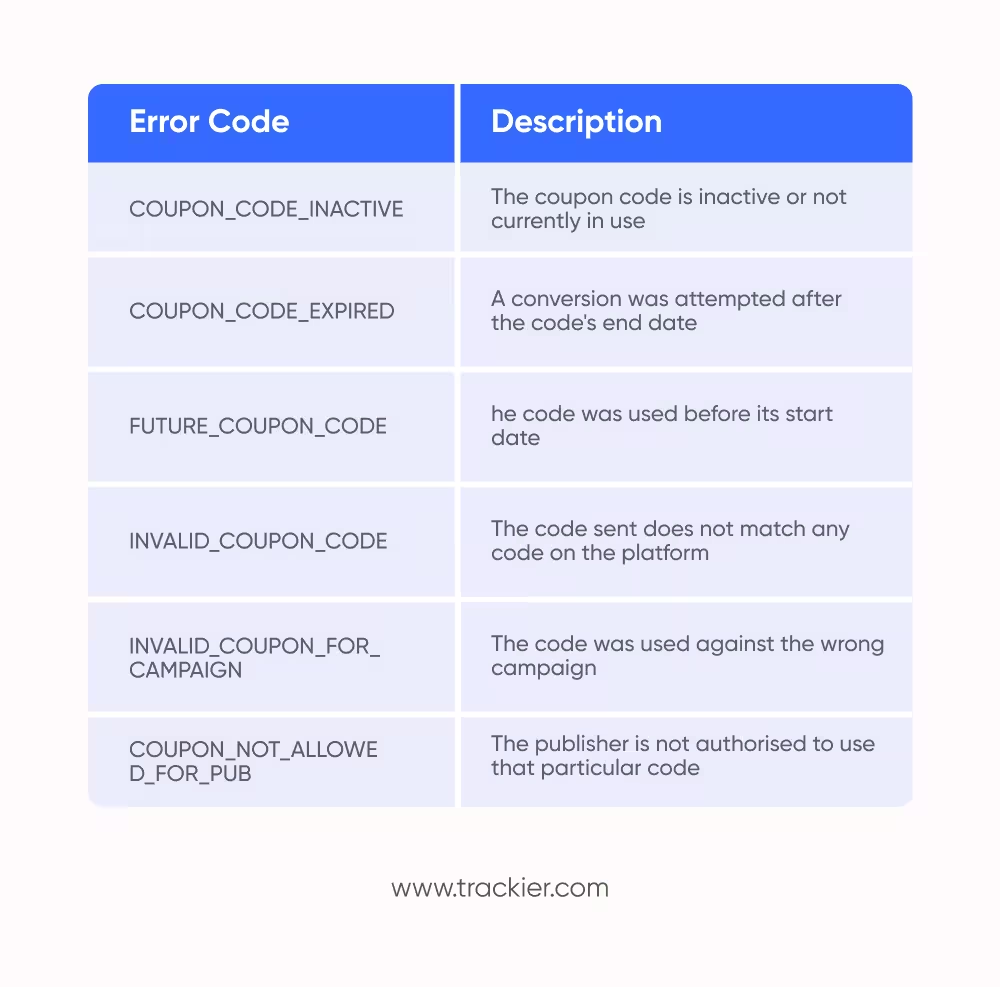
If conversions are not being recorded as expected, the following tools and common error codes can help identify the issue:
Postback Debug Report Navigate to Advertiser > Postback Hit Received in the sidebar to inspect incoming postbacks and identify any failures.
Pixel Logs For pixel-based campaigns, errors are visible in the pixel logs, accessible from the relevant campaign or advertiser.
Each error code has a meaning as mentioned below.
Need Help?
If you run into any issues while setting up coupon codes or configuring tracking, Trackier’s support team is available via the in-platform chat or at support@trackier.com. We will make sure your conversions are never left unattributed.
FAQ
How can brands prevent coupon abuse and unauthorized affiliate code sharing?
Brands can reduce coupon abuse by using publisher-level restrictions, expiration windows, one-time-use codes, and code whitelisting. These controls help prevent leakage, unauthorized promotion, and commission payouts tied to invalid or unintended coupon usage. A proper coupon code tracking setup further strengthens this by flagging unauthorized usage in real time and ensuring only eligible publishers receive attribution.
Why is coupon attribution important for measuring affiliate partner performance?
Coupon attribution helps brands identify which partners are truly driving conversions, not just distributing codes. It improves commission accuracy, partner evaluation, and budget allocation by turning coupon activity into a measurable performance channel. With coupon code tracking in place, brands gain full visibility into which affiliate is responsible for each conversion, making performance data far more reliable and actionable.
Can coupon code tracking improve influencer and creator partnership measurement?
Yes, coupon code tracking is often used to measure influencer-driven sales when users convert without clicking links. It gives brands a reliable way to track creator impact, reward partners fairly, and compare performance across channels. Since influencers typically share codes rather than trackable links, coupon code tracking becomes the primary tool for attributing sales back to the right creator accurately.
