
Trackier has just rolled out Partner Pay for cleaner and faster publisher payouts that are much easier to manage.
If your team deals with tax detail mismatches, bank verification issues, or too many payout follow-ups, this update is worth your attention. Partner Pay brings PAN, GST, and bank verification into one workflow, gives admins more control over reviews and re-checks, and makes payout readiness easier to track.
If you are already exploring Trackier Pay for invoice automation and reconciliation, this update fits right into that workflow.
Why Publisher Payouts Get Delayed Before Money Even Moves
Most publisher payouts delays begin when the information behind the payout is still unclear.
A publisher enters one name on a bank record, another on tax details, and something slightly different on the account itself. Suddenly, a simple payout becomes anything but simple. It turns into follow-ups, edits, screenshots, and manual checks.
The FTC said consumers reported losing more than $12.5 billion to fraud in 2024, which was 25% higher than the year before. That does not mean every payout issue is fraud, of course. But it does show why identity checks, payment checks, and cleaner approval logic matter much more than they used to.
You can see the same logic in formal compliance systems too.
In the US, the IRS offers TIN Matching so payers can validate name and tax ID combinations before filing.
In India, the RBI says KYC is meant to collect and verify identity, address, nature of business, and financial status so services are not misused. Different systems, same basic idea. Bad records create bad payment workflows.
The ‘admin drag’ shows up in very ordinary ways. A payout goes on hold. A publisher asks what happened. Ops checks the record. Finance waits. Nobody loves that loop.
Partner Pay brings verification closer to the point where data is submitted, not weeks later when someone is already asking for money.
How Partner Pay Gives Publisher Payouts a Cleaner Start
The new Partner Pay workflow is built around the idea to get the important details in early, verify them quickly, and show status before payout eligibility comes into question.
When publishers submit their details, the form captures legal name, address, PAN number, optional GST number, bank account number, IFSC code, bank name, branch, and even the agreement if the admin has uploaded one.
Once submitted, the system runs API-based verification checks.
Partner Pay checks whether the PAN is valid and fetches the registered name. It validates GSTIN and fetches the linked PAN. It also validates the bank account and IFSC, then compares the account holder’s name against the PAN name using similarity matching.
The status logic is also clear, which helps both publishers and admins move faster.
If all checks pass and the match is 70% or higher, the record becomes ‘Verified’. If checks pass but the match falls between 50 and 70%, the status becomes ‘Pending’. If the match is below 50%, or an API check fails, the record is ‘Rejected’.
| Condition | Status | Publisher View |
| All checks pass, ≥70% match | ✅ Verified | Green banner, form locked |
| All checks pass, 50–70% match | 🟡 Pending | Editable form |
| <50% match or API failure | ❌ Rejected | Error shown |
Verified records become payout-eligible. Pending and rejected ones do not.
Publishers can see when they still need to fix something. Admins can quickly spot which records are ready, which ones need review, and which ones should not move to payout yet.
What Makes This Update More Useful Than a Basic Verification Form?
A basic form collects data. Trackier’s Partner Pay goes a step further and gives admins room to act when real-world records are imperfect.
That is important because publisher payouts data is rarely neat. Sometimes the legal name has an abbreviation.
Sometimes a bank check fails on the first try. Sometimes the record is mostly right, but still needs a human decision. Partner Pay supports that reality. Admins can open the publisher profile, view detailed KYC information, edit fields, run Re-verify, and manually set the record to Verified, Pending, or Rejected when needed.
There is also agreement handling built into the flow.
Admins can upload a PDF agreement inside Customize → Partner Pay, publishers can view it as View Agreement, and a new file replaces the old one. That makes the workflow feel more complete, especially for teams that want documentation and payout readiness tracked together.
What Can Admins Do When Verification Gets Stuck?
In the real world, records don’t always fail because the user entered completely wrong information.
Sometimes the problem is small, like a short form of the name, a bank record that returns slightly differently, or even a first attempt that just needs another pass.
Partner Pay gives admins room to handle that without turning the process into another exhausting email thread.
Admins can open the publisher profile, click View Details, review legal, tax, and bank information, and check the current verification result.
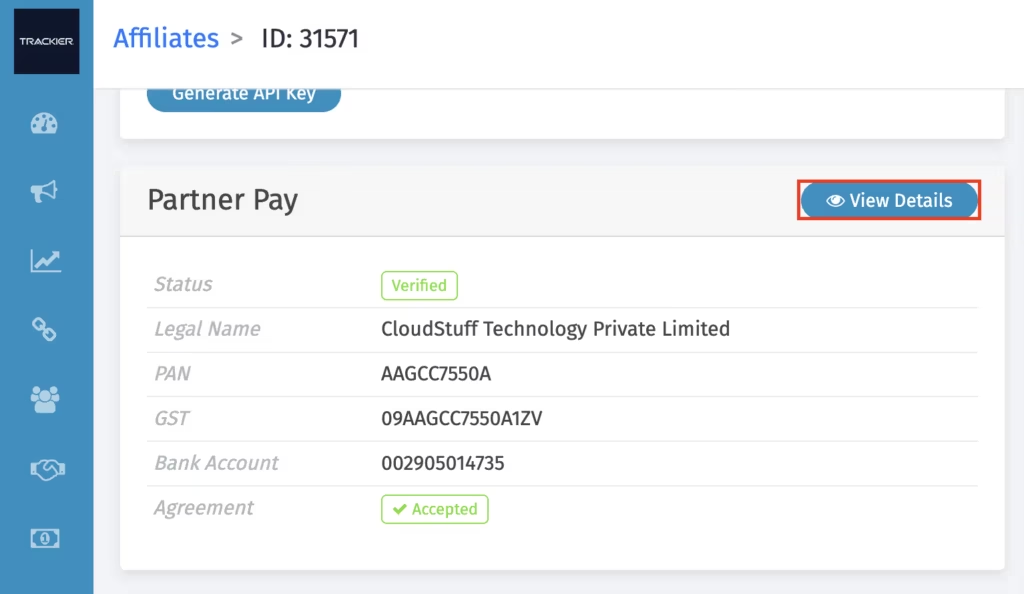
If something needs to change, they can edit the record directly. After edits, the status moves to Pending, and the admin can run Re-verify manually.
An edit alone does not trigger verification again. The admin has to choose when to run it. That gives more control and avoids accidental rechecks when a record is still being reviewed.
There is also a manual override option.
If the record is close enough and the team has supporting context, the admin can set the status to Verified, Pending, or Rejected. If it is rejected, a reason can be added. Once the status is Verified, the publisher becomes eligible for publisher payouts. If the status stays Pending or Rejected, payout eligibility does not move forward.
That is a small but useful detail. It connects review logic to payout readiness in a way teams can actually act on.
What Does it Mean For Day-To-Day Ops?
For partner teams, it cuts back on repeated back-and-forth. For finance teams, it reduces the chance of reviewing payment details too late in the cycle. For publishers, it gives clearer information on what is wrong and what needs to be fixed before payout time.
Agreement Handling is Part of The Update Too!
One useful part of this rollout is that agreement handling fits inside the same flow.
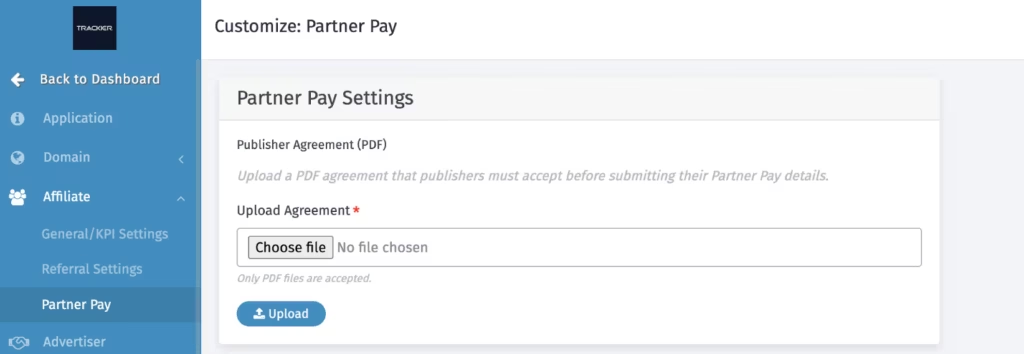
Admins can upload a PDF agreement from Customize → Partner Pay.
Publishers can then open it as View Agreement while submitting their details. If a new file is uploaded later, it replaces the earlier one. The file is stored securely inside the workflow.
That may sound like a small feature, but it solves quite a familiar issue.
When agreements are all in one place, tax details in another, and payout approval in a third place, the process becomes really slow, way slower than it needs to be. Bringing those checkpoints closer together helps teams keep things tidy and easier to review.
It also makes the experience look more complete from the publisher side. They are not just sending bank and tax details into a blank system. They can see the agreement, submit the required information, and move through a defined process.
That is a better onboarding experience, and a cleaner audit trail too.
To Sum Up
Trackier has introduced Partner Pay as a meaningful update to the publisher payouts workflow.
It brings PAN, GST, and bank verification into one process. It gives admins more room to review, edit, re-verify, and approve records when needed. It also connects verification status directly to payout eligibility, which is where the real operational value shows up.
If your current publisher payouts process still depends on scattered checks, manual follow-ups, and late-stage fixes, this update is worth paying attention to.
The next step is simple.
Review your current onboarding flow, identify where verification usually breaks, and line that up against what Partner Pay now supports. That will show you very quickly where time gets lost and where this rollout can help.
Hungry for more? Download our free case studies that cover real stories.
Or sign up for Trackier’s newsletter to get weekly best practices on referral programs and partner marketing.
Frequently Asked Questions
1. Can publisher payouts workflow be compliant and still feel easy for publishers?
Yes, if the flow asks only for the details that matter, verifies them early, and gives clear status updates. A good publisher payouts workflow should not feel like a maze. It should help publishers know what to submit, what failed, and what to fix without long email loops.
2. Why do name mismatches happen even when the publisher entered correct details?
Name mismatches often happen because different records store names in slightly different formats. A PAN record may show the full legal name, while a bank record may shorten it or format it differently. That is why KYC verification flows usually need both automation and admin review, not just one or the other.
3. Should finance teams wait until publisher payouts day to check payment details?
No. That is usually when delays become expensive. The smarter approach is to verify tax and bank details earlier in the cycle, before the publisher becomes payout-ready. Early publisher payout verification reduces blocked payments, repeated follow-ups, and last-minute approval pressure.
4. Does better verification really help partner relationships?
Yes. Publishers care about payment clarity more than most teams think. When publisher payouts are delayed without a clear reason, trust drops fast. A cleaner verification process gives partners more visibility, fewer surprises, and more confidence that the publisher payouts process is under control.