Not all conversions are expected to be scrutinized and analysed at the same level. An action as simple as a sign-up or registration does not hold the same risk as a high-value goal like a first deposit. Due to this difference, both cannot be validated in the same way.
It is necessary to close this gap between the two opposite actions. With the Goal Level Conversion Status Control feature, Trackier now lets clients configure different default conversion statuses for each individual goal within a campaign. This gives advertisers and networks far more accuracy over the way conversions are approved and the amount of attention they actually require.
What Is Goal-Level Conversion Status Control?
With the goal level conversion status control feature, clients are able to set a different default conversion status for every goal in a campaign. Now they don’t have to apply one blanket status across all the types of conversions. Through this, clients get a better hold over conversion approval workflows depending on the type of goal setting and the level of validation in requires.
If we were to understand this more practically, it means that low-risk and high-risk actions can now be treated differently from the goal configuration step itself.
For example, a registration goal can be set to “Automatically Approved” so that it’s processed instantly, while a sensitive, high-value goal can be set as “Pending”, which would require a manual review before it’s approved.
Why This Feature Matters
Treating all the conversions the same way can cause friction that is unnecessary and even fraud. Earlier, applying a single conversion status across an entire campaign meant choosing between speed and safety for every goal, even when they didn’t carry the same risk profile.
With the goal level conversion status control update, clients can now apply the right approval workflow to each goal individually, rather than being locked into one status for every conversion in the campaign.
Key Benefits
- Flexible conversion management – Configure approval rules separately for each goal within a campaign.
- Better fraud control – Keep sensitive, high-value conversions pending until they’ve been reviewed.
- Improved workflow efficiency – Automate approval for low-risk conversions and reserve manual review for the actions that actually need it.
- Campaign-level customisation – Support different validation requirements for different goals, all within the same campaign.
How Does Goal Level Conversion Status Feature Work?
While creating or editing a goal, clients can now select a “Default Conversion Status,” which is one of two kinds –
- Approved – Conversions for this goal are automatically approved.
- Pending – Conversions for this goal require manual review and approval before they’re confirmed.
Steps to Configure
Setting this up takes just a few steps:
- Open the relevant campaign and navigate to the Goals section.
- Create a new goal, or open an existing one to edit.
- Select the required “Default Conversion Status”; this can be either approved or pending.
- Save the goal configuration.
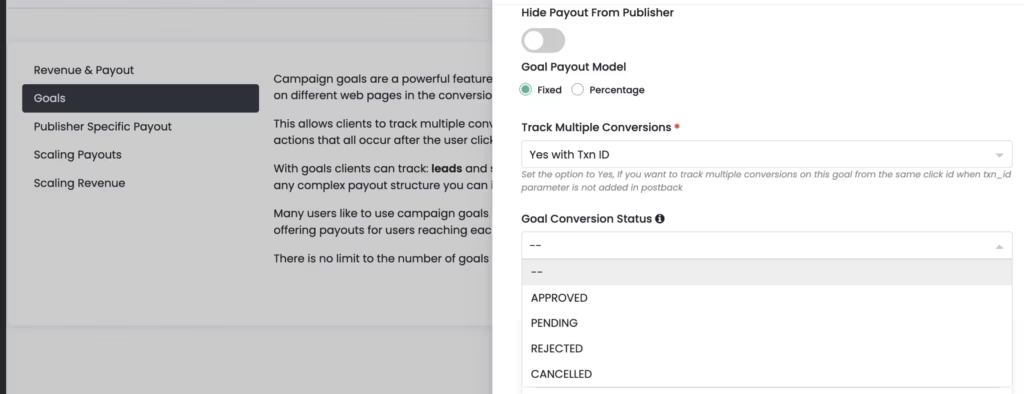
Once saved, the selected status will apply to all future conversions generated for that specific goal.
A Few Tips to Consider
- Reserve “pending” status for goals that are sensitive to fraud or where the transaction value is high enough to justify a manual check.
- Reserve “approved” status for goals where speed is to be prioritised.
- Campaigns evolve with time, and hence, their settings must be revisited. This is because what is low risk now may not always stay that way.
Take More Control Over Conversion Workflows
Goal Level Conversion Status Control puts the approval process where it belongs, and that is on the goal itself. The result of this is faster processing for the conversions that don’t need to be closely monitored.
Questions about setting this up for your campaigns? Reach out at support@trackier.com or via the in-platform chat.