Imagine you want to see how visitors interact with your website, what links they click, which products they buy, and which activities turn them into verified conversions.
By adding a small snippet of code to your site, you can measure visitor actions and see exactly which marketing campaigns drive real sales.
Understanding how this mechanism operates helps you set up cleaner reporting and better campaign attribution. Here is a simple breakdown of how JavaScript tracking works and how to use it effectively.
According to W3Techs, over 98% of all websites rely on JavaScript, so adding a small snippet of code to your site allows you to measure visitor actions and see exactly which marketing campaigns drive real sales.
How Does JavaScript Tracking Work?
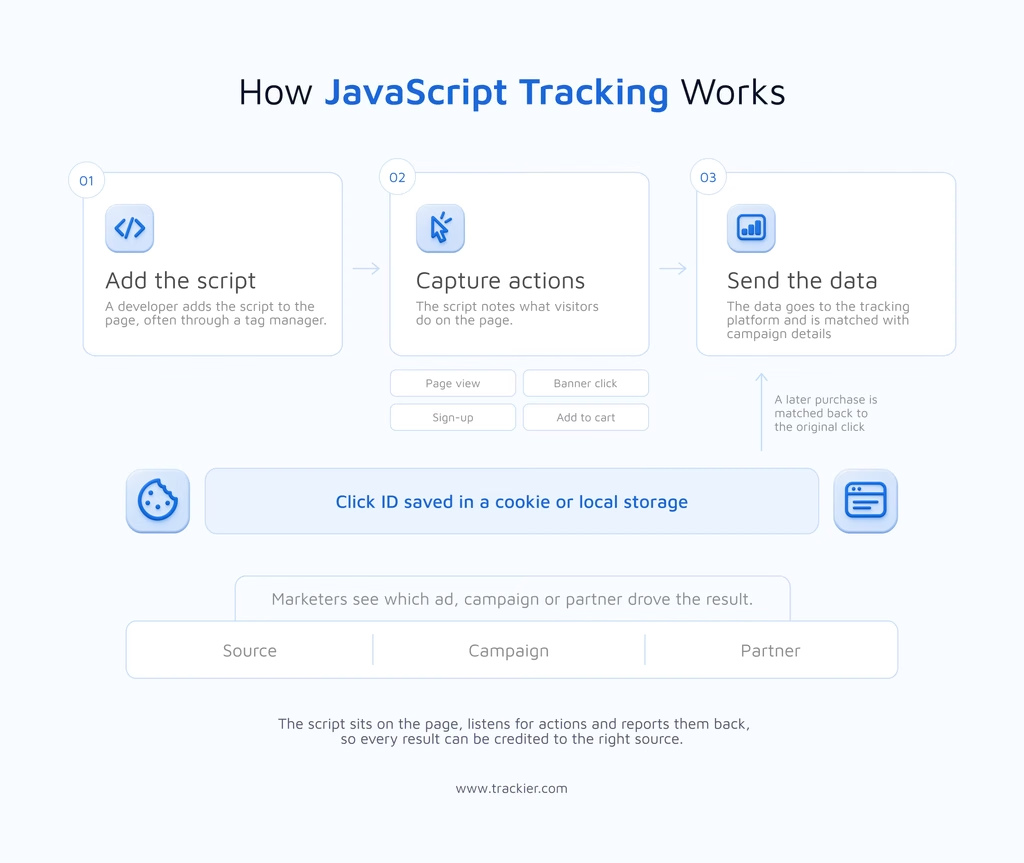
Tracking with JavaScript means adding a script to a website to keep track of what visitors do. Whenever someone opens the web page, the script runs in their browser to track page views, clicks, and conversions and passes the data to a tracking platform.
The process of tracking with JavaScript usually includes three steps:
Add Script to a Page
First, the developer places the script in the page’s HTML. Many teams add it through the tag manager so they don’t need to edit the site code each time. After this setup, the site tag tells the script what to record and when. Once the JavaScript tracker is live, it loads whenever the page is viewed.
Track User Actions and Events
Once the tracking code has been added to your website, the script will listen for any actions. When someone clicks a banner, completes sign-up, or adds items to the cart, it will create an event. This event will store information in cookies/local storage so we can track where they clicked/visited.
Send Data to the Tracking Platform
The script will then send the data to the tracking platform. This data will be used to match the campaign details. Marketers can then see which ads, campaigns, or partners drove these results.
Why Use JavaScript tracking
In JavaScript tracking, the user’s device tracks the data. The browser then sends the report to your tracking platform. This differs from server-side tracking, where the data comes from the server’s own records. It is also called client-side tracking.
While understanding JS-based tracking, a doubt must arise: why use it if you are already using pixel-based or server-to-server tracking? We will understand this further.
JS-Based Tracking vs Pixel Tracking
Let’s see how JS-based tracking is different from Pixel tracking.
| Point of comparison | JavaScript tracking | Pixel Tracking |
| What it is | A script that runs in the visitor’s browser | A tiny, transparent image that loads with the page |
| What it records | Page views, clicks, scroll depth, form submissions, and custom events | Page views and basic conversions only |
| Data depth | Detailed and flexible | Basic |
| Setup | Needs a script or tag manager | Very simple |
| Page weight | Heavier, and can slow a page down if poorly written | Very light |
| Main drawback | Can be blocked by ad blockers and browser privacy settings | Limited data, as it only confirms that something happened |
Advantages Of JS-Based Tracking
The main advantages of JavaScript are that it is flexible and more accurate. Let’s understand these advantages in more detail.
More Accurate Data
Using scripts means that you can collect more detailed information such as time spent on the page, scroll depth, clicks, and device information that you would miss with simple tracking. This gives you more in-depth information about how people behave before they get converted.
Track Custom Events And Conversions
You can create custom events for whatever you want to track, like video plays, form submissions, and in-app actions using JavaScript. You can set your tracking tag to only trigger when certain conditions are met, which makes it very easy to adapt your tracking depending on your campaign needs.
Real-Time Data Capture
JavaScript code will run instantly in the browser and provide real-time data to your tracking platform. This allows you to get instant attribution updates, trigger dynamic responses, and report on the data in real time.
Flexible and Dynamic Data Passing
Unlike static tracking methods, JS can be used to extract dynamic data from the DOM of your webpage. This could include product ID, order value, promo codes, or session data and will be automatically added to your tracking payload.
Disadvantages Of JS-based Tracking
The main drawback of JavaScript is that it relies on the visitor’s browser, so the data you collect may get affected by ad blockers or script errors.
Blocked By Ad Blockers And Browsers
As the tracking runs within the browser, the user can block it. This means that if the user has an ad blocker on the website or high privacy settings in the browser, then the tracking won’t collect data. There are also limitations on how long your cookies can last on browsers like Safari and Firefox.
Slow Page Load And Errors
If your script is heavy or not well written, then it can cause your website to load slowly. If there is even a small error in the code, then it can also mean that your events are not triggered. You should regularly check your setup to ensure data is still being collected.
JS-Based Tracking In Affiliate Marketing
Using a JavaScript tracker in affiliate marketing helps to track clicks and conversions on the advertiser’s site. When a visitor lands on the website through an affiliate link, the script will store the click ID.
If the visitor then makes a purchase later on the website, the script will report it back to the affiliate tracking platform, meaning the partner gets credited. This can be useful during landing pages and checkouts to understand the behaviour of customers before purchase in detail. It can be used alongside server-to-server tracking.
Start Using JS-based Tracking If You Want To Get Reports In More Detail
As you have seen above, JavaScript tracking is different from postback tracking and pixel tracking. Tracking with JavaScript is a core part of modern digital tracking.
It provides detailed data from the browser and supports flexible conversion tracking. There are also some limitations, like ad blockers, so many advertisers pair it with other methods, like server-to-server tracking, to make the tracking more accurate.
If you want to get latest updates in partner marketing, follow our LinkedIn newsletter.
