A click may seem like a simple process, but what goes on behind the scenes is more critical. This process revolves around capturing valuable information like click IDs, publisher IDs, campaign details, and device information. The capturing of this information should be instant and accurate. This cannot and must not be done manually.
This is what Trackier macros are meant for.
It is through this that affiliate platforms can pass the right data to the right place at the right time.
This article aims to explain the macros that Trackier offers and how they work.
What are Trackier Macros?
These macros are reserved spaces, like placeholders that are placed in tracking URLs and postbacks. This is what they look like – {click_id}, {publisher_id}, {campaign_title}
When a tracking link is clicked or a conversion is fired, Trackier automatically replaces these placeholders with actual real-time values. When correctly configured, Trackier replaces the macro with the actual value.
Where are Macros Used?
Trackier macros are primarily used in two places, and those are –
- Tracking URLs – These are the links that publishers share with their audiences. Macros embedded here populate click-level data like click ID, publisher ID, device type, and location at the moment a user clicks.
- Postbacks – When a conversion happens, the advertiser fires a postback towards Trackier. The macros present in the postback URL carry the conversion data like the payouts, transaction ID, and goal details back so that Trackier can attribute them accurately.
Some macros work in both places. Others are only relevant for postbacks. This means that they only carry meaningful data at the time of conversion, not at the time of the click. This difference matters when setting up the URLs.
How Trackier Macros Actually Work
The flow for this is direct.
- A user clicks a Trackier tracking link
- Values of macros like {click_id}, {campaign_id}, and {publisher_id} are generated and populated
- The user reaches the advertiser’s destination
- When a conversion occurs, the advertiser fires a postback carrying {click_id} back to Trackier
- Trackier matches the conversion to the original click using that ID
A {click_id} is hence non-negotiable as it holds the whole journey together. Without it, Trackier cannot match a conversion to the click that caused it, which can break the entire attribution system.
The Complete List of Trackier Macros
Campaign Macros
These macros pass campaign-level information through the tracking URL.
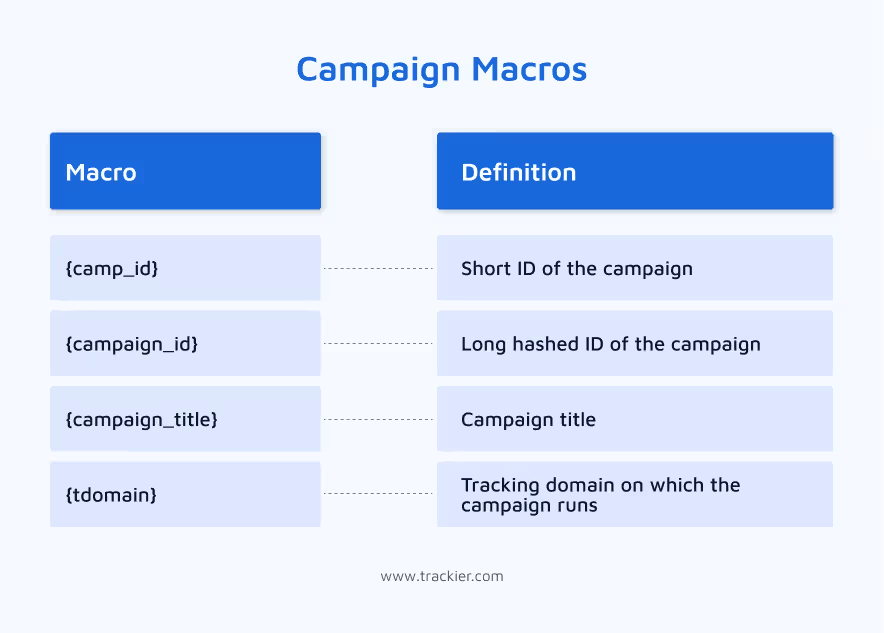
Example: https://advertiser.com?cid={campaign_id}
When triggered, {campaign_id} is replaced with the actual campaign ID.
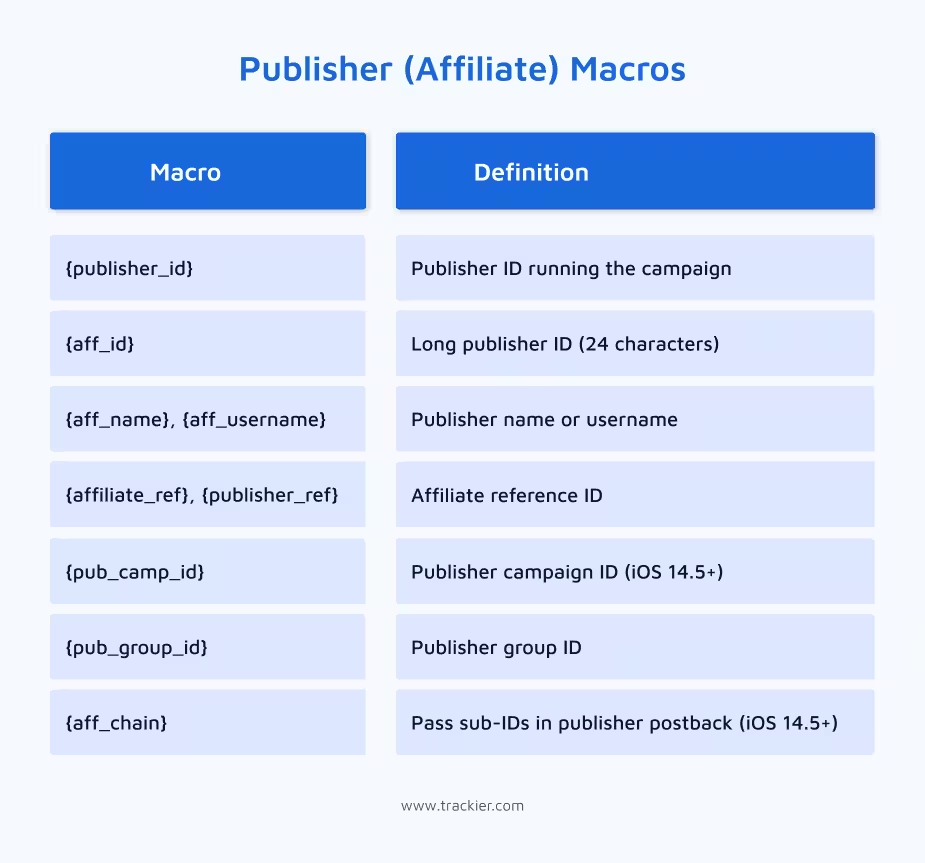
Publisher (Affiliate) Macros
These macros identify the publisher driving the traffic.
Click Tracking Macros
These are among the most commonly used macros — they capture everything about the click itself.
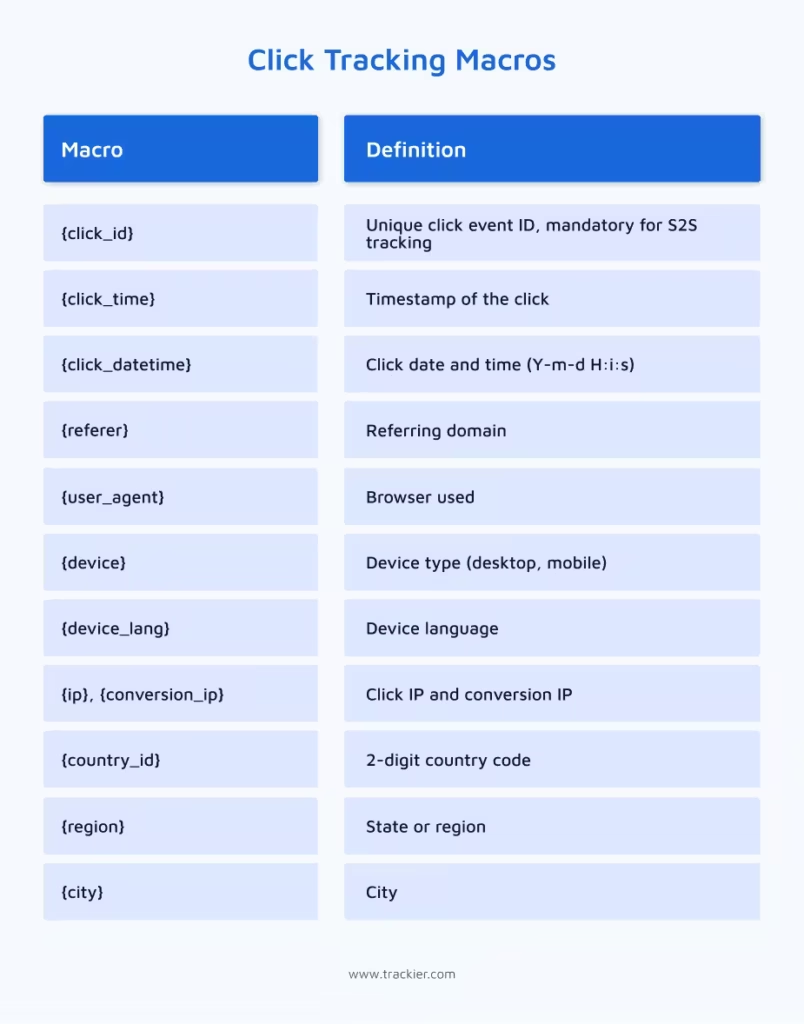
{click_id} is mandatory for accurate conversion tracking. Every S2S setup must include it.
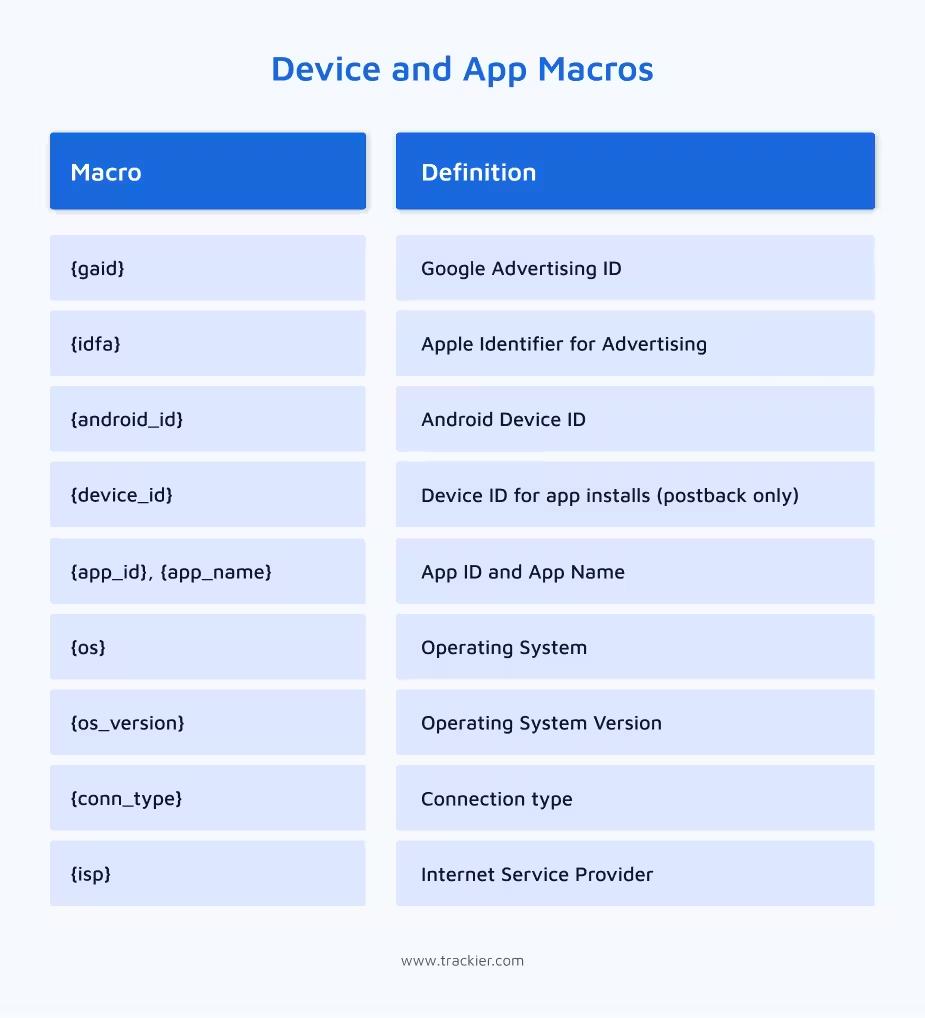
Device and App Macros
These macros are especially relevant for mobile and app-based campaigns where device-level data is needed for attribution.
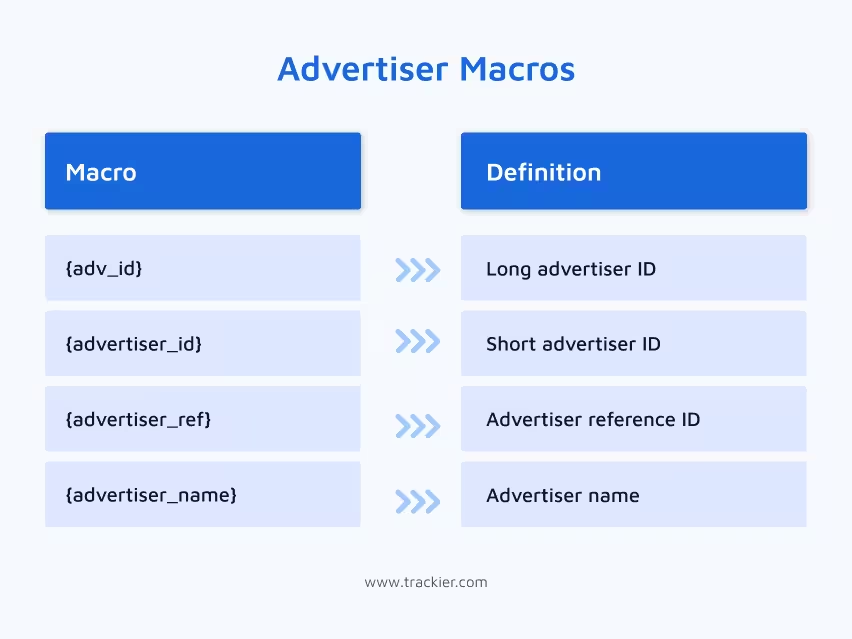
Advertiser Macros
These macros identify the advertiser associated with a campaign.
Revenue and Payout Macros (Postback Only)
These macros only carry meaningful data at the time of conversion. They are used inside postback URLs, not tracking links.
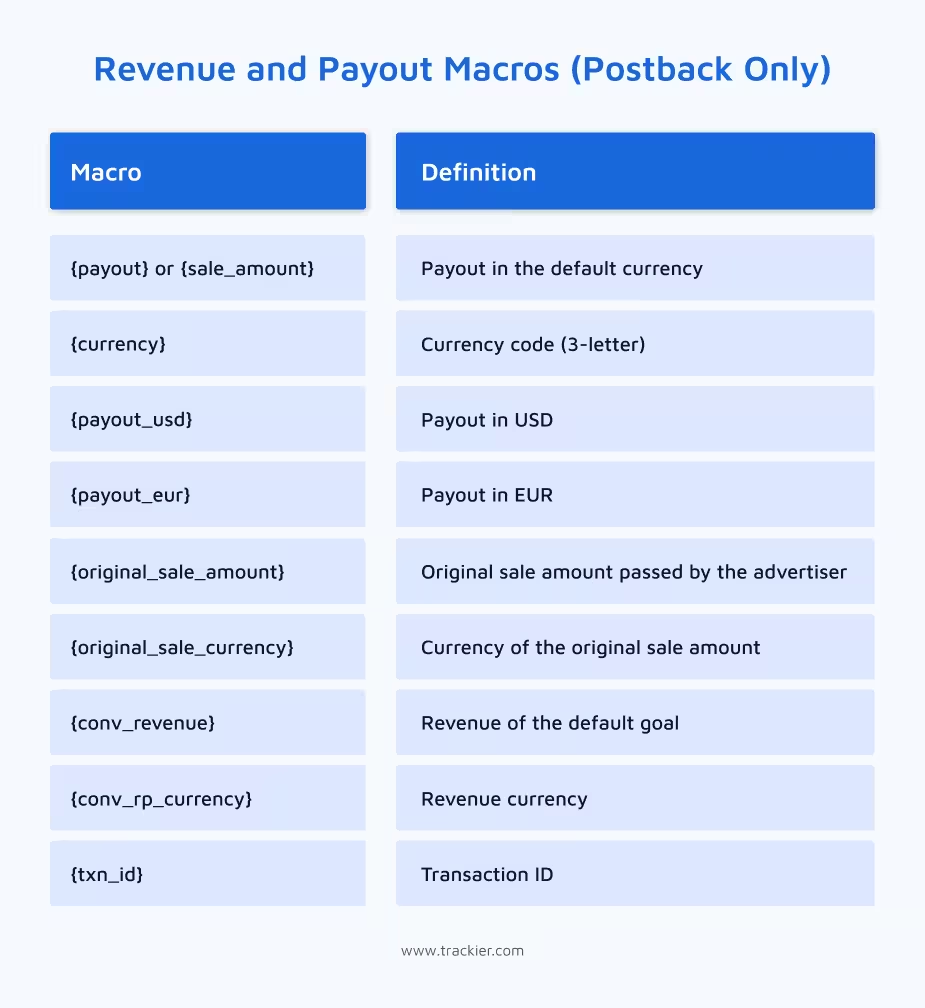
These are particularly important for campaigns with variable payouts. Here, the commission depends on the actual sale amount rather than a fixed rate.
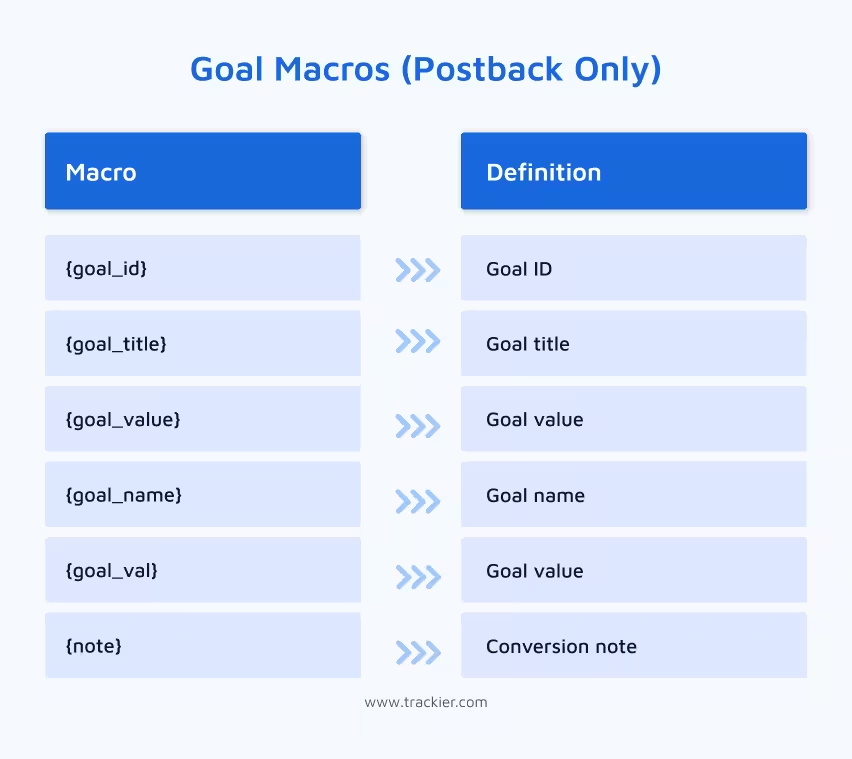
Goal Macros (Postback Only)
For campaigns with multiple conversion goals such as registration, purchase, and upsell, these macros help Trackier identify which specific goal was completed.
Tracking Parameter Macros
These macros capture custom parameters that are appended to tracking links — useful for passing additional data from publishers or sub-publishers.
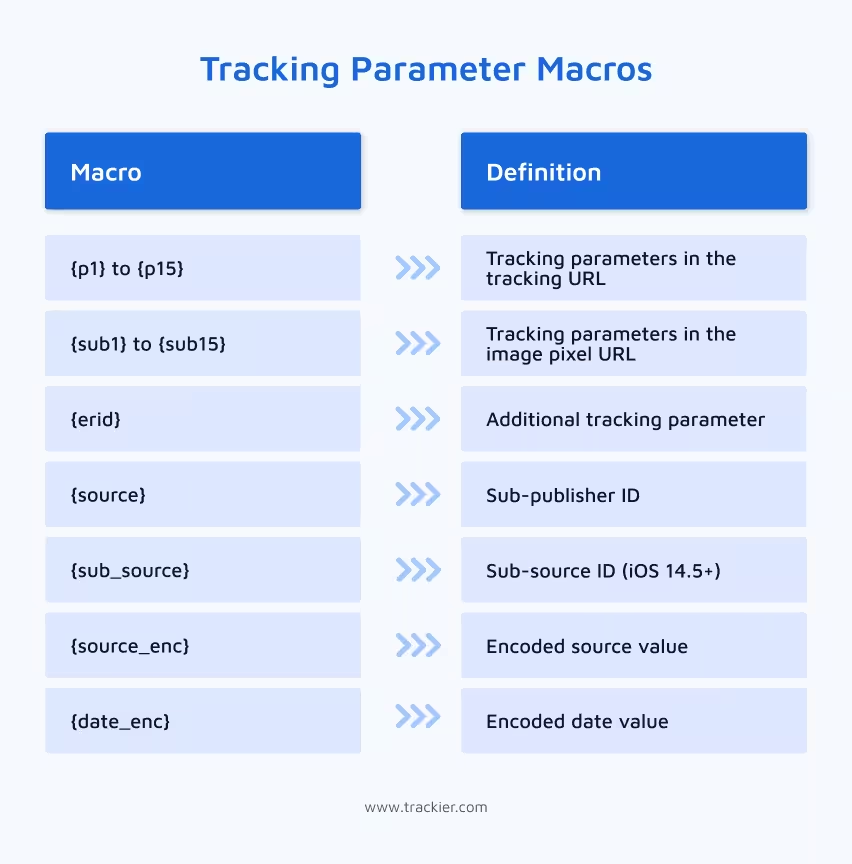
Example: If the tracking URL contains ?sub1=facebook, then {sub1} will return “facebook” wherever it is placed.
Landing Page Macros
These macros are used when campaigns involve multiple landing pages, and you need to track which one was used.
| Macro | Definition |
| {url_id} | Numeric ID of the landing page used |
Note: If the default landing page is used, {url_id} may return empty.
Random Macros
Random macros generate dynamic values on the fly. They are useful for cache busting or creating unique identifiers where a fixed value is not available.
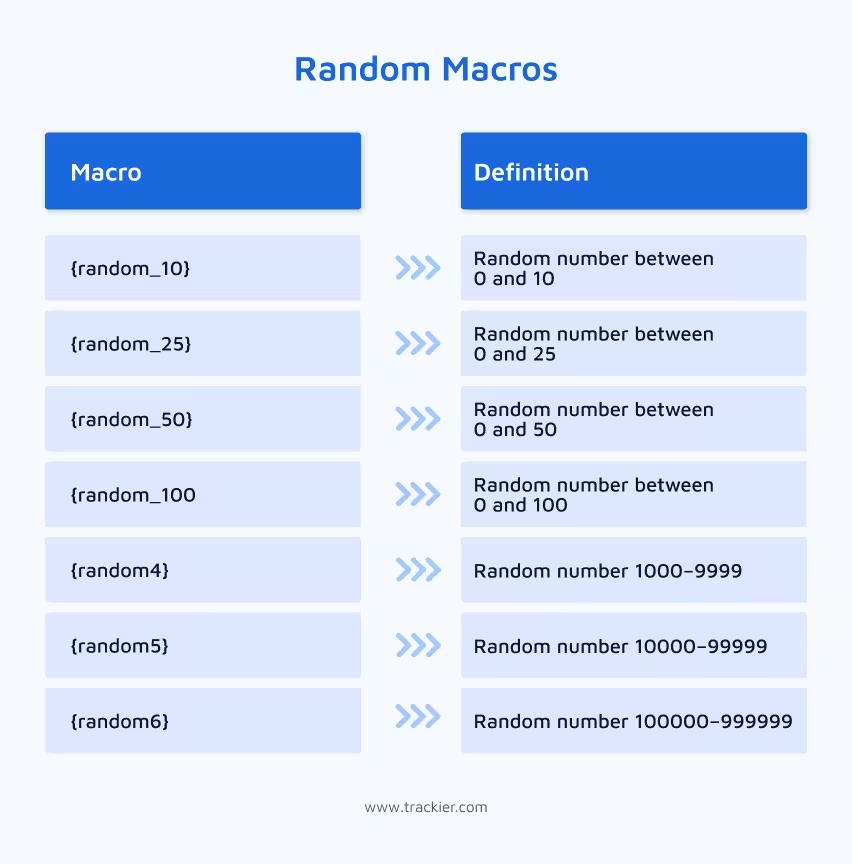
Example: &subid=pub_{random_100} will dynamically generate a unique sub-id with a random number appended.
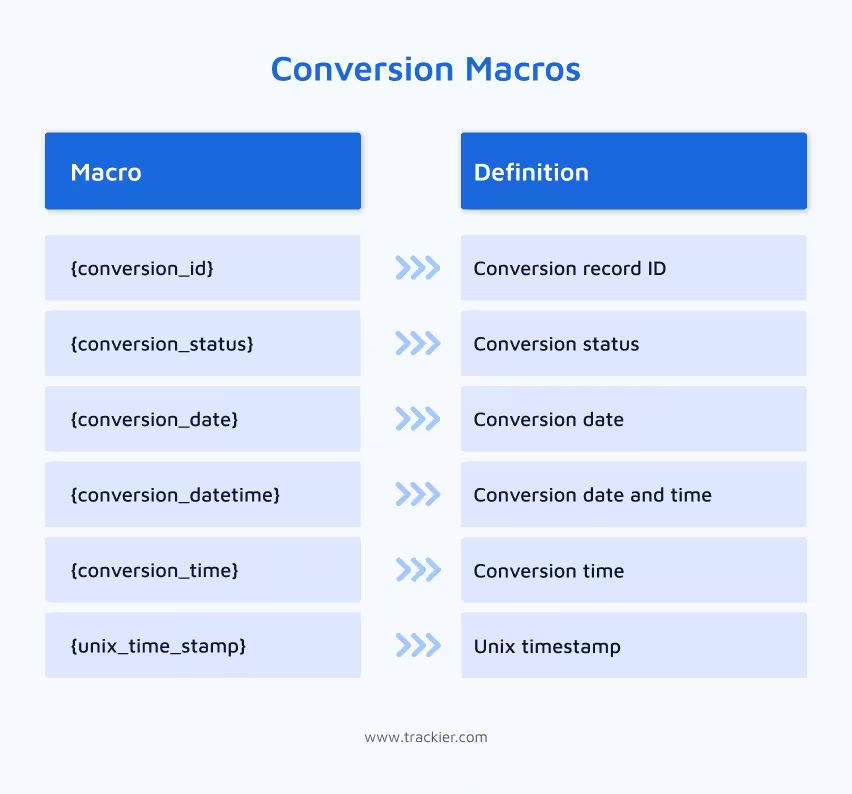
Conversion Macros
These macros capture data specifically about the conversion event itself. That is, when it happened, what its status is, and how it is identified.
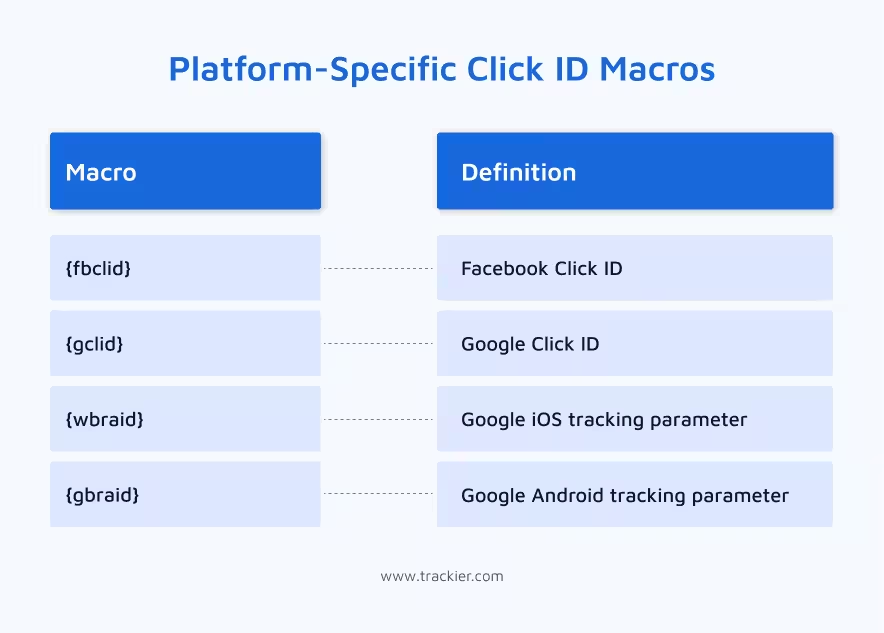
Platform-Specific Click ID Macros
These macros populate the native click IDs generated by advertising platforms. They are useful when running campaigns across Google and Facebook simultaneously and need platform-level attribution data alongside Trackier’s own tracking.
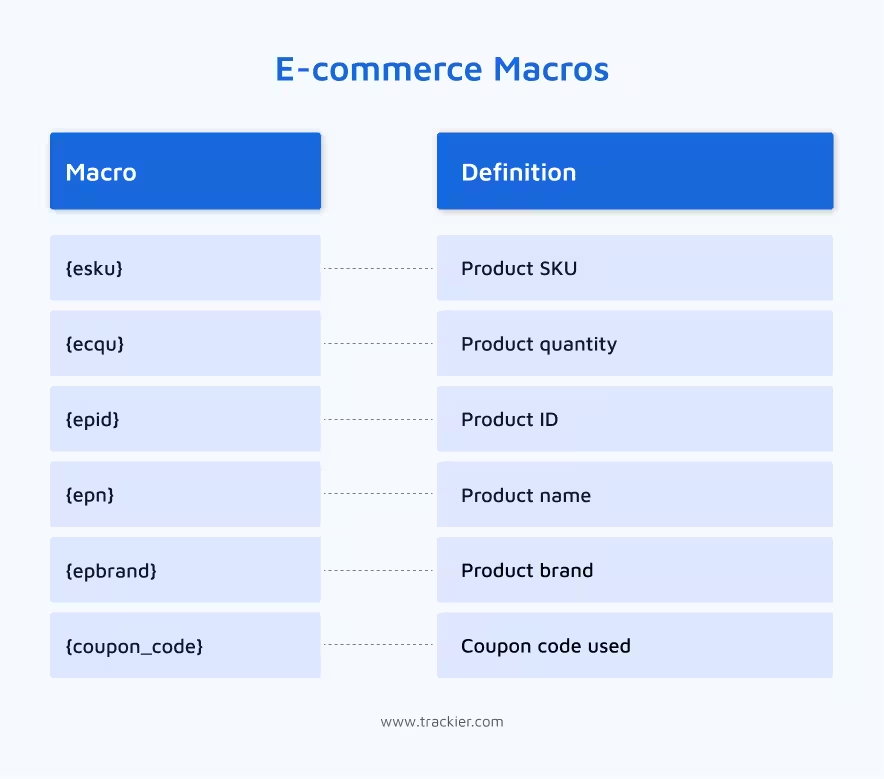
E-commerce Macros
For advertisers running product-level campaigns, these macros pass granular purchase data back through the postback. This makes it possible to track the conversion and the exact purchase as well.
Important Things to Keep in Mind
While working with Trackier macros, certain things must be taken into consideration.
- {click_id} is mandatory for S2S tracking: If it is missing from your advertiser URL, conversions will not be attributed correctly. This is the one macro you cannot skip.
- Postback-only macros belong in postbacks, not tracking links: Revenue, payout, goal, and conversion macros carry data that only exists at the time of conversion. Placing them in a tracking link will return empty values.
- Macros must be placed correctly in both advertiser and publisher URLs: A macro in the wrong place will either return nothing or cause a mismatch in reporting. Always verify placement before going live.
Wrapping it Up
Trackier macros are what make performance marketing measurable. Every conversion attributed to the right publisher, every payout calculated correctly, every campaign report that reflects reality. All of it runs on macros working in the background.
The more accurately they are configured, the more reliable your data becomes. And reliable data is what good decisions are made from.
Need Help?
If you run into any issues while configuring Trackier macros or need guidance on which macros to use for your specific setup, our support team is available via the in-platform chat or at support@trackier.com. We will make sure your tracking is set up right from day one.
FAQ
What are Trackier macros and how do they work?
Trackier macros are dynamic placeholders used inside tracking URLs and postbacks. When a tracking link is clicked or a conversion fires, Trackier automatically replaces these placeholders with real-time values like click IDs, publisher IDs, and campaign details. This eliminates the need for any manual data entry.
Which Trackier macro is mandatory for server-to-server tracking?
{click_id} is the only mandatory Trackier macro for S2S tracking. It creates a unique identifier for every click, which the advertiser returns via postback when a conversion occurs. Without it, Trackier cannot match the conversion to the original click, making accurate attribution impossible.
Can Trackier macros be used in both tracking URLs and postbacks?
Most Trackier macros work in both tracking URLs and postbacks. However, certain macros such as revenue, payout, goal, and conversion macros are postback-only. These only carry meaningful data at the time of conversion, so placing them inside a tracking link will return empty values.
How many types of Trackier macros are there?
Trackier macros are organised into 13 categories. These categories are campaign macros, publisher macros, click tracking macros, device and app macros, advertiser macros, revenue and payout macros, goal macros, tracking parameter macros, landing page macros, random macros, conversion macros, platform-specific click ID macros, and e-commerce macros.
