While a campaign is being set, advertisers often ask for certain specific information that must be passed to them. This information can be –
- Click ID
- Publisher ID
- Campaign details
- Device information
- Impression ID
These values are not pre-existent and are generated actively as and when the conversions occur. So the question that arises here is, how does Trackier send this information to advertisers automatically?
The answer is tracking macros.
Macros are placeholders that Trackier replaces with actual values in real time. They make it possible to pass tracking information from Trackier to the advertiser without any manual intervention.
Understanding how these macros work is essential for setting up advertiser tracking URLs and impression URLs correctly.
What are Advertiser Tracking Macros?
Tracking macros are like a reserved space within the tracking link of the advertiser’s URL. When a user clicks on a tracking link, Trackier automatically replaces these placeholders with actual values before redirecting the user to the advertiser.
This allows the advertiser to receive the exact information required for tracking and attribution.
Why are Macros Needed?
When creating a campaign, advertisers usually provide a tracking URL. However, just the URL alone is not enough.
The advertiser expects specific values to be passed whenever a click occurs. Since those values are generated in real time, Trackier uses macros to populate them automatically. No manual insertion of values needed.
The Advertiser Parameter and Trackier Macros Relationship
While working with tracking macros, the most important thing that must be taken into consideration is understanding the difference between an advertiser parameter and a Trackier macro.
When an advertiser shares a tracking link, it looks like this –
Here, aff_sub and aff_sub2 are the advertiser parameters. The values on the right –
YOUR_CLICK_ID and YOUR_PUB_AND_SUB_PUB_ID
are placeholders that need to be replaced with the appropriate Trackier macros. That is –
Once it is configured, Trackier automatically replaces {click_ID with an actual unique click ID and {publisher_ID} with the actual publisher ID every time a click occurs.
To understand this better, we can say –
Advertiser parameter = Trackier Macro
While the advertiser specifies the parameter, Trackier fills in the value.
Why Click ID is the Most Important Macro
Among all available tracking macros, {click_ID} is the most important one, especially in server-to-server tracking. The reason for this is that –
- When a user clicks on a tracking link, Trackier generates a unique click ID and passes it to the advertiser via the tracking URL
- When a conversion happens, the advertiser sends that same click ID back to Trackier through a postback.
Through this, Trackier figures which specific click led to the conversion.
The absence of this macro completely breaks the loop. Due to this, Trackier might fail to attribute the conversion to the right publisher or campaign. This is why it is mandatory for all S2S tracking setups.
The Full List of Advertiser Tracking Macros
On the basis of the advertiser’s requirements, different macros can be used inside the tracking URL. They fall into four categories, and they are as follows –
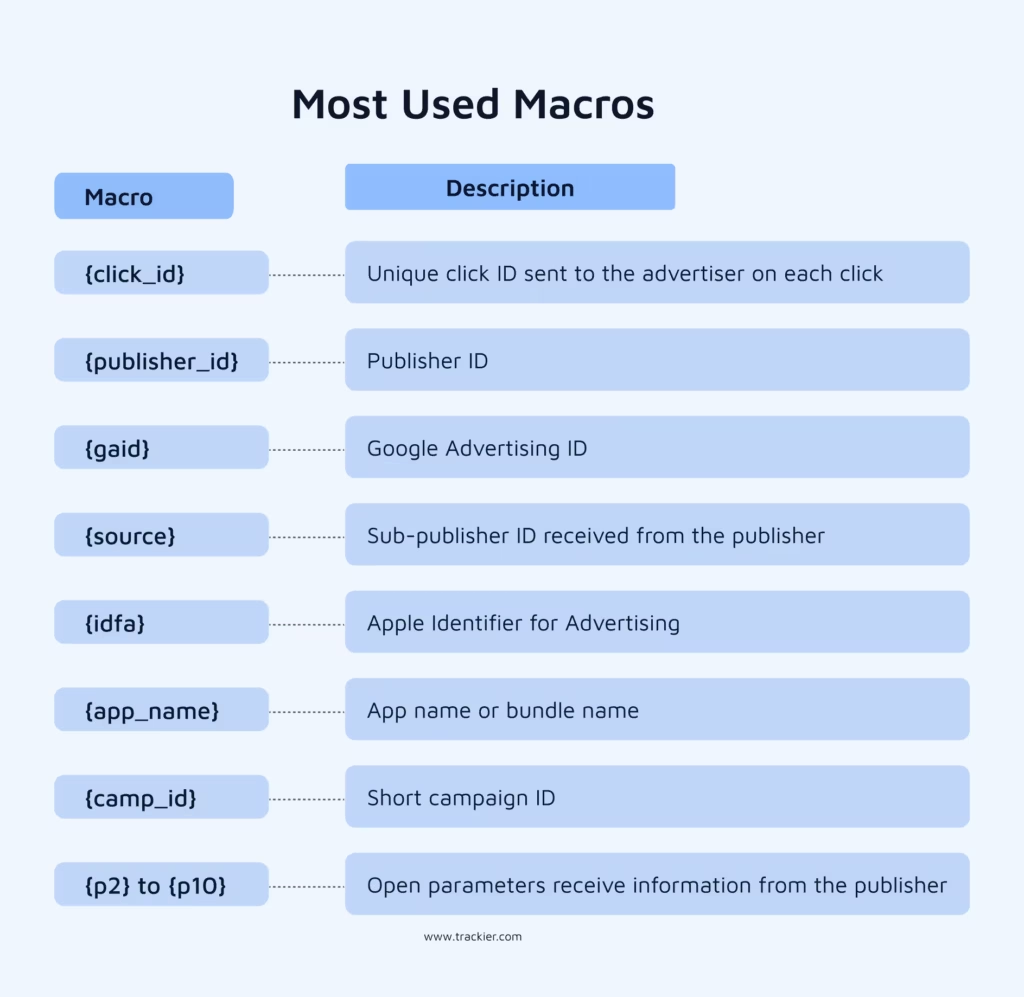
Most Used Macros
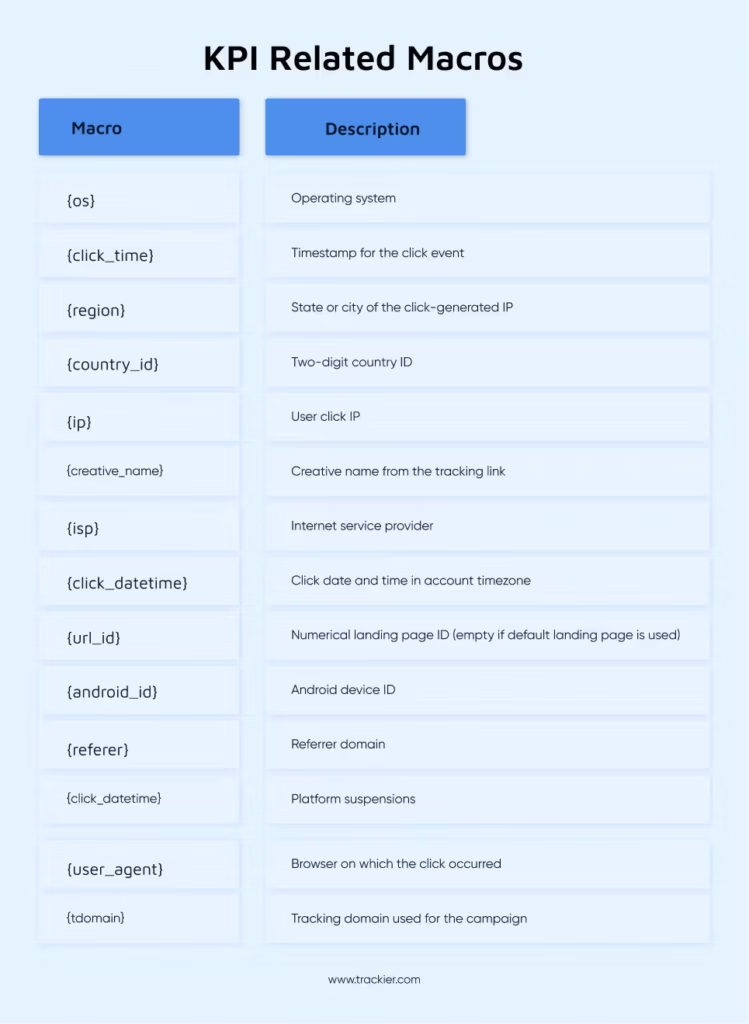
KPI Related Macros
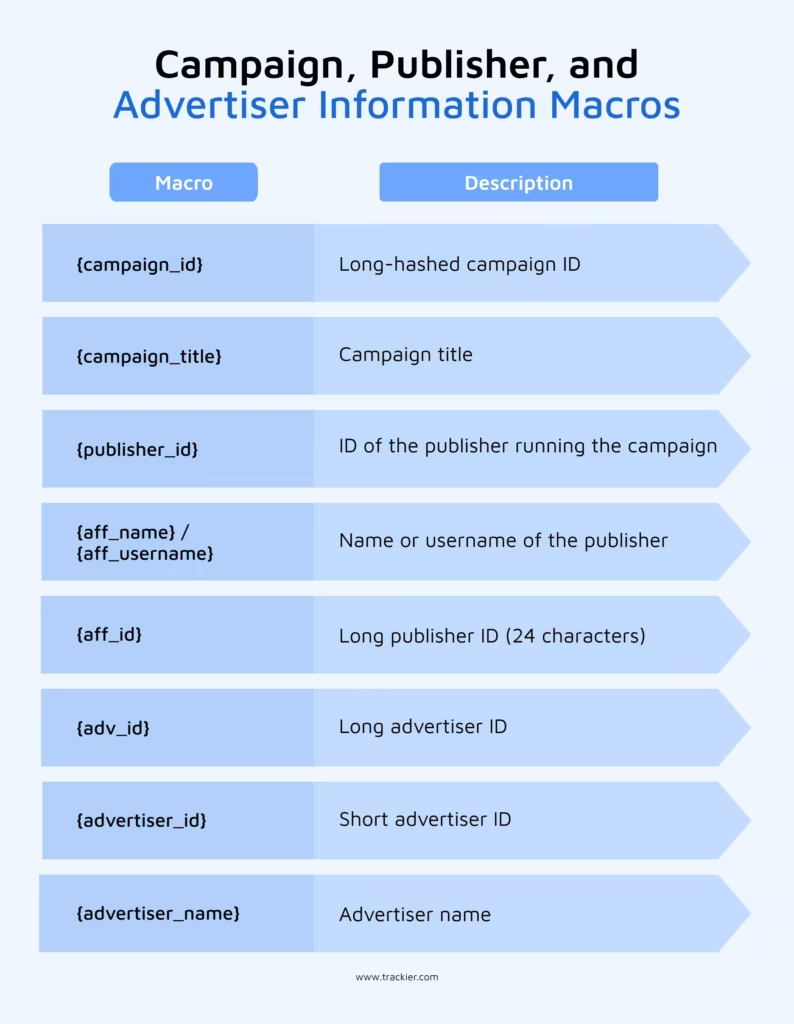
Campaign, Publisher, and Advertiser Information Macros
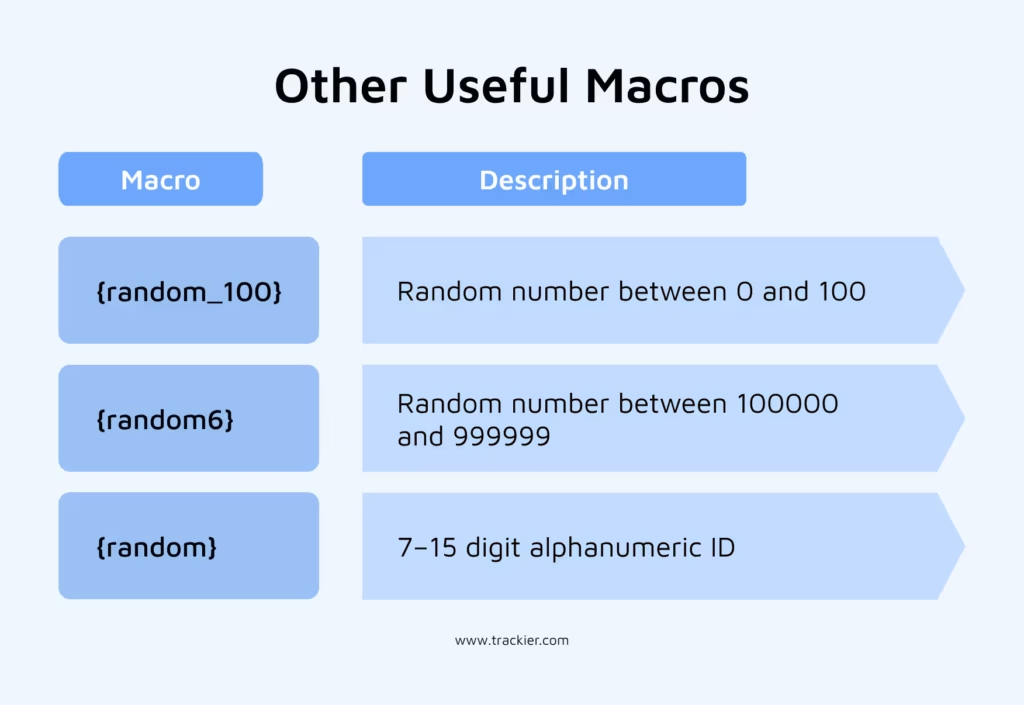
Other Useful Macros
Impression Tracking Set Up
Clicks and impressions are different, and so is the way they are tracked or even set up.
- Click tracking fires when a user actively clicks on an ad.
- Impression tracking fires when the impression URL is triggered. No click is required here.
If an advertiser wants to measure reach and visibility in addition to clicks and conversions, impression tracking is what makes that possible.
An advertiser impression URL looks like something like this –
<img src=”https://trk.domain.com/22csc234r2qx/impression?impression_id=YOUR_IMPRESSION_MACRO>
Just like with click tracking, the placeholder value needs to be replaced with the appropriate Trackier’s tracking macro, and that is –
<img src=”https://trk.domain.com/22csc234r2qx/impression?impression_id={imp_id}/>
The macros available for impression URLs are –
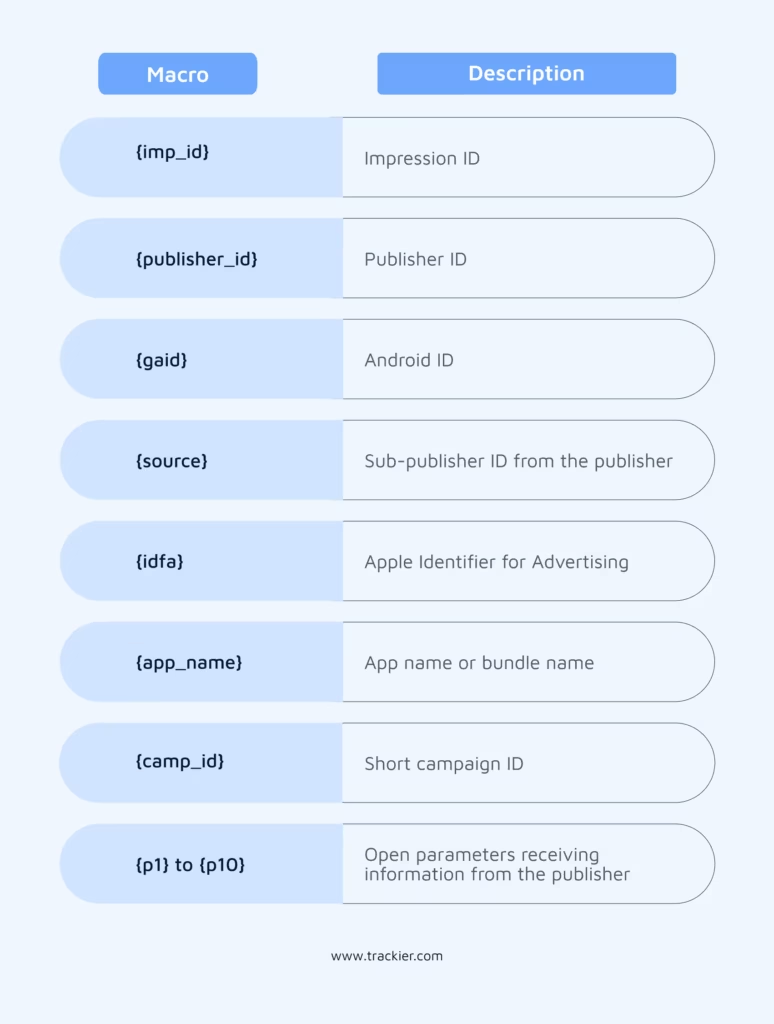
The major difference here is that {click_id} is the mandatory macro for click tracking. {imp_id} is its equivalent for impression tracking.
Using the right macro in the right URL is what keeps tracking accurate and avoids any scope of confusion.
Wrapping It Up
Macros are the foundation of how Trackier communicates with advertisers.
- Every conversion that gets attributed correctly
- Every publisher that gets paid accurately
- Every campaign report that makes sense
All of it depends on macros being configured correctly from the start.
The advertiser shares the parameters they need. Trackier gives the macro to fill it. Getting this pairing right makes the entire tracking setup actually function.
Need Help?
If you run into any issues while configuring advertiser tracking macros or impression URLs on Trackier, our support team is available via the in-platform chat or at support@trackier.com. We will make sure your tracking is set up right from day one.
FAQ
What are tracking macros and why are they used in affiliate marketing?
Tracking macros are special placeholders in ad tracking links. They automatically fill in details like click IDs or publisher IDs during conversions. This means that Trackier can efficiently gather this information in real time, ensuring accurate tracking and attribution across many conversions without extra hassle.
Can the same tracking macros be used for both click tracking and impression tracking URLs?
Not quite. Some macros, like {publisher_id}, {gaid}, and {source}, work for both, but click tracking relies on {click_id}, while impression tracking uses {imp_id}. If you mix them up, you’ll end up with inaccurate data or even lose some altogether.
Is {click_id} the only mandatory tracking macro for S2S setups?
Yes, it is. {click_id} is crucial because it connects a click to a conversion. When someone clicks, Trackier sends this macro to the advertiser, who then returns it through postback after a conversion happens. Without {click_id}, there’s no way to keep the attribution intact.
