You launch a campaign. The publisher sends traffic. Clicks come in, but conversions stay low. Not because the offer is bad. Not because the publisher is underperforming. But because the traffic reaching your landing page was never the right fit to begin with. This is a problem that pre-landing pages are built to solve.
What Is a Pre-Landing Page?
A pre-landing page sits between the publisher tracking link and the main landing page. Before a user even reaches the final offer page, they pass through this intermediate layer first. Think of it as a checkpoint. The pre-landing page is where you decide who gets through and who does not.
It could be a short questionnaire that checks a user’s interest level. It could be an age verification gate. It could be a brief explainer that prepares the user for the offer they are about to see. Whatever form it takes, the goal is the same: to make sure the traffic that reaches your main landing page is relevant, interested, and likely to convert.
Why It Matters
In performance marketing, every click has a cost. When unqualified traffic reaches the final page, that cost goes to waste. The publisher has done their part. The click happened. But if the user was never going to convert, the entire journey was a lost spend. Pre-landing pages help you recover that efficiency by doing a few things.
They send only relevant and interested users forward to the main offer. They filter out traffic that does not meet your criteria, whether that is based on age, geography, interest, or intent. They educate users about what they are about to see, which often improves the quality of the interaction once they do arrive.
They also allow you to run entirely different experiences for different audiences, so a user from Germany can see a different pre-lander than a user from India, even if they are both part of the same campaign. The result is better conversion rates, lower wasted spend, and a cleaner funnel overall.
How the User Journey Works
The flow is straightforward once it is set up. The user clicks the publisher tracking link and lands on the pre-landing page. The pre-lander then filters or qualifies the user based on whatever criteria you have defined. If the user meets the requirement, they are automatically redirected to the main landing page. The conversion, when it happens, is recorded as it normally would be.
From the user’s perspective, it feels like a natural part of the experience. From your perspective, it means every visitor who reaches the final page has already cleared a baseline of relevance.
Placing the Script on Your Pre-Landing Page
If you want the pre-landing page to redirect users to the landing page that the publisher has selected in their account, you need to place a specific script on the pre-landing page.
Add the following code just before the closing </body> tag:
<script src=”//trk.xyz.com/js/prelander.js”></script>
Replace trk.xyz.com with your actual tracking domain.
One thing to keep in mind: the click element on the pre-landing page, the button or link that moves the user forward, needs to be wrapped inside an <a> tag for the redirect to work correctly.
Setting It Up on Trackier
To create a pre-landing page in Trackier, go to your campaign settings, navigate to the Landing Pages section, click on Actions, and select New Landing Page. From there, choose the type as Pre-Landing.
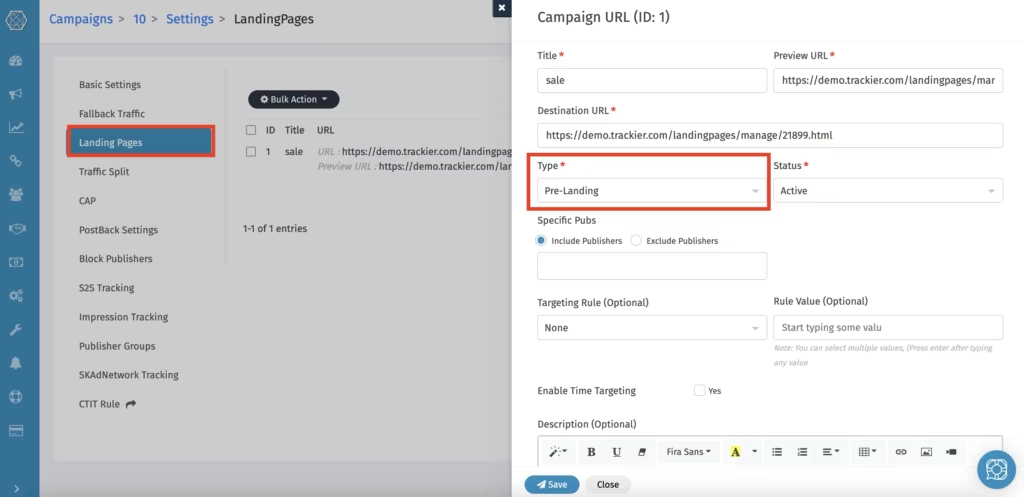
You will then fill in the details:
Title is what you name this landing page internally so you can identify it later.
Preview URL is the link you use to review how the page looks.
Destination URL is the actual URL where the pre-landing page is hosted.
Type should be set to Pre-Landing.
Status lets you set it as active or paused, depending on whether you want it live right away.
Targeting Rule is where you define who this pre-lander applies to. You can target by country, region, city, or ISP.
Rule Value is where you enter the specific value for that targeting rule.
Description is an optional internal note for your own reference.
Once saved, the pre-landing page is ready to be attached to a publisher tracking link.
Attaching It to a Publisher Tracking Link
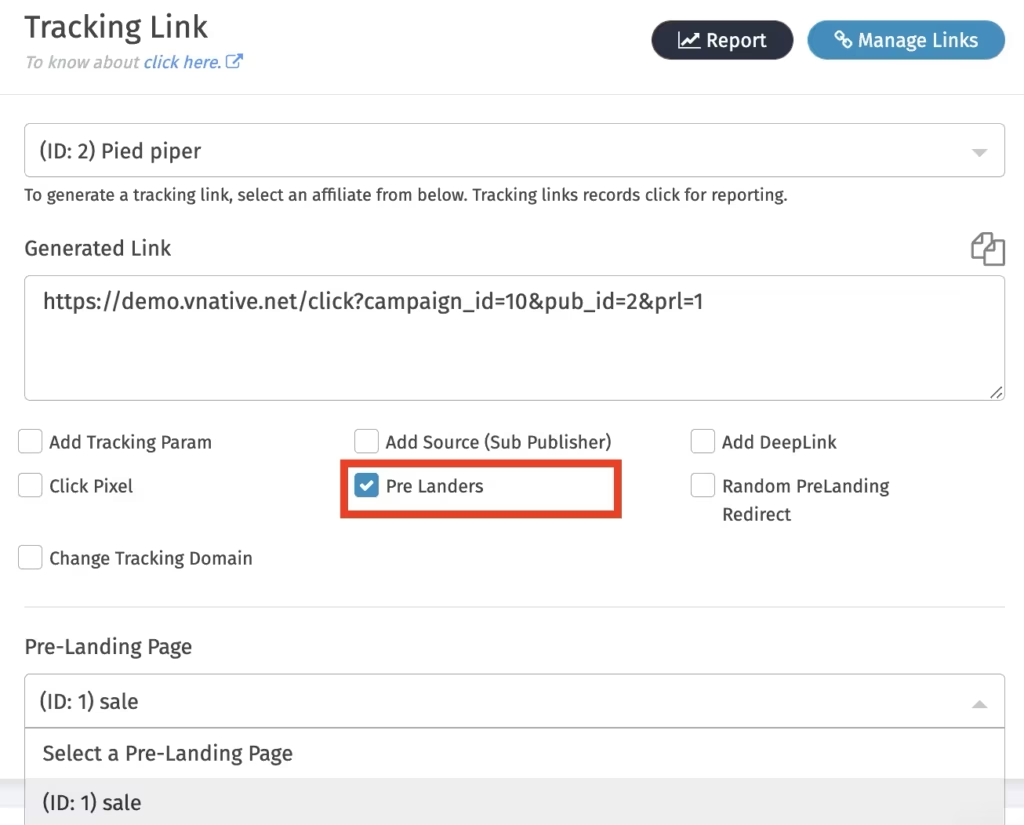
Creating the pre-landing page is only the first step. To actually use it, you need to attach it to the relevant publisher’s tracking link.
Go to the publisher you want to configure this for, generate the tracking link, and enable the Pre-Landers option. Select the pre-landing page you just created and click Update.
Once this is done, the tracking link will automatically include the parameter &prl=1. Any traffic coming through that link will pass through the pre-landing page before reaching the main offer.
Share the updated link with your publisher, and the setup is complete.
A Few Things Worth Keeping in Mind
Pre-landing pages work best when the filtering logic is specific and intentional. A vague questionnaire or a generic intro page will not do much. The more clearly you define who should and should not proceed, the more useful the pre-lander becomes.
You can also run different pre-landers for different countries, cities, ISPs, or audience segments within the same campaign. Trackier’s targeting rules at the landing page level make this possible without needing to duplicate campaigns entirely.
If you are promoting a finance offer that is only relevant to users above a certain age, or a regional service that only applies to specific cities, a well-configured pre-lander can quietly handle that filtering without adding friction for the right users.
The Bigger Picture
Pre-landing pages are not just about blocking bad traffic. They are about giving good traffic a better path to conversion. When a user arrives at the main landing page already informed and already qualified, the offer has a much higher chance of landing.
Setting this up inside Trackier keeps it tied to the same campaign ecosystem where your tracking, attribution, and publisher management already live. That makes it easier to manage, test, and scale as your programme grows.
Need Help?
If you have questions while setting up pre-landing pages or attaching them to publisher links, Trackier’s support team is available through the in-platform chat or at support@trackier.com.
FAQs
Can I use different pre-landing pages for different publishers within the same campaign?
Yes. Pre-landing pages are attached at the publisher tracking link level, which means each publisher can have a different pre-lander even within the same campaign. This gives you full control over the experience based on the traffic source.
Do I need to create a new campaign for each pre-landing page?
No. You can add multiple pre-landing pages within the same campaign and assign them to specific publisher links. There is no need to duplicate campaigns just to test or use different pre-landers.
What happens if a user does not complete the pre-landing pages criteria?
If the user does not meet the criteria you have defined, they simply do not get redirected to the main landing page. The experience can vary depending on how the pre-lander is built, but qualified users are the only ones who proceed further in the funnel.
Can I target specific geographies with different pre-landers?
Yes. Trackier allows you to set targeting rules at the landing page level based on country, region, city, or ISP. This means you can serve different pre-landing pages experiences to different audience segments without changing the core campaign setup.
Will pre-landing pages affect my conversion tracking?
No. The conversion tracking works the same way regardless of whether pre-landing pages are in the flow. Once the user passes through the pre-lander and reaches the main landing page, attribution and conversion recording continue as normal.
