Precision and speed are no longer just advantages, they are requirements. As privacy regulations tighten and browser-based tracking becomes less reliable, performance marketers need robust solutions to ensure their data remains accurate and their campaigns stay profitable.
Trackier’s integration with Google Ads via the specialized Google Ads Link and Conversion API (CAPI) is designed to solve these modern challenges.
The Evolution of Tracking: Why the Google Ads Link Matters
With the rise of ad blockers and privacy updates like iOS 14+, “signal loss” has become a major hurdle. Google’s updated policies now require click trackers to be certified and compliant to avoid campaign interruptions.
Trackier’s link feature is a direct response to these shifts. By generating compliant tracking links that integrate seamlessly with Google’s ecosystem, Trackier ensures that your attribution remains “unbroken.”
Key Benefits of Using Trackier for Google Ads
- Policy Compliance: Stay ahead of Google Ads’ stringent certification guidelines for click trackers.
- Zero Signal Loss: Capture the GCLID (Google Click Identifier) accurately, even when browsers try to block traditional scripts.
- Real-Time Optimization: Stop waiting for daily reports. Trackier feeds data back to Ads instantly, allowing the Google AI to optimize your bids.
- Publisher Management: Easily assign specific Google Ads campaigns to your publishers while maintaining control over tracking transparency.
Deep Dive: How Trackier Enhances Google Ads Performance
1. Seamless Link Generation & Compliance
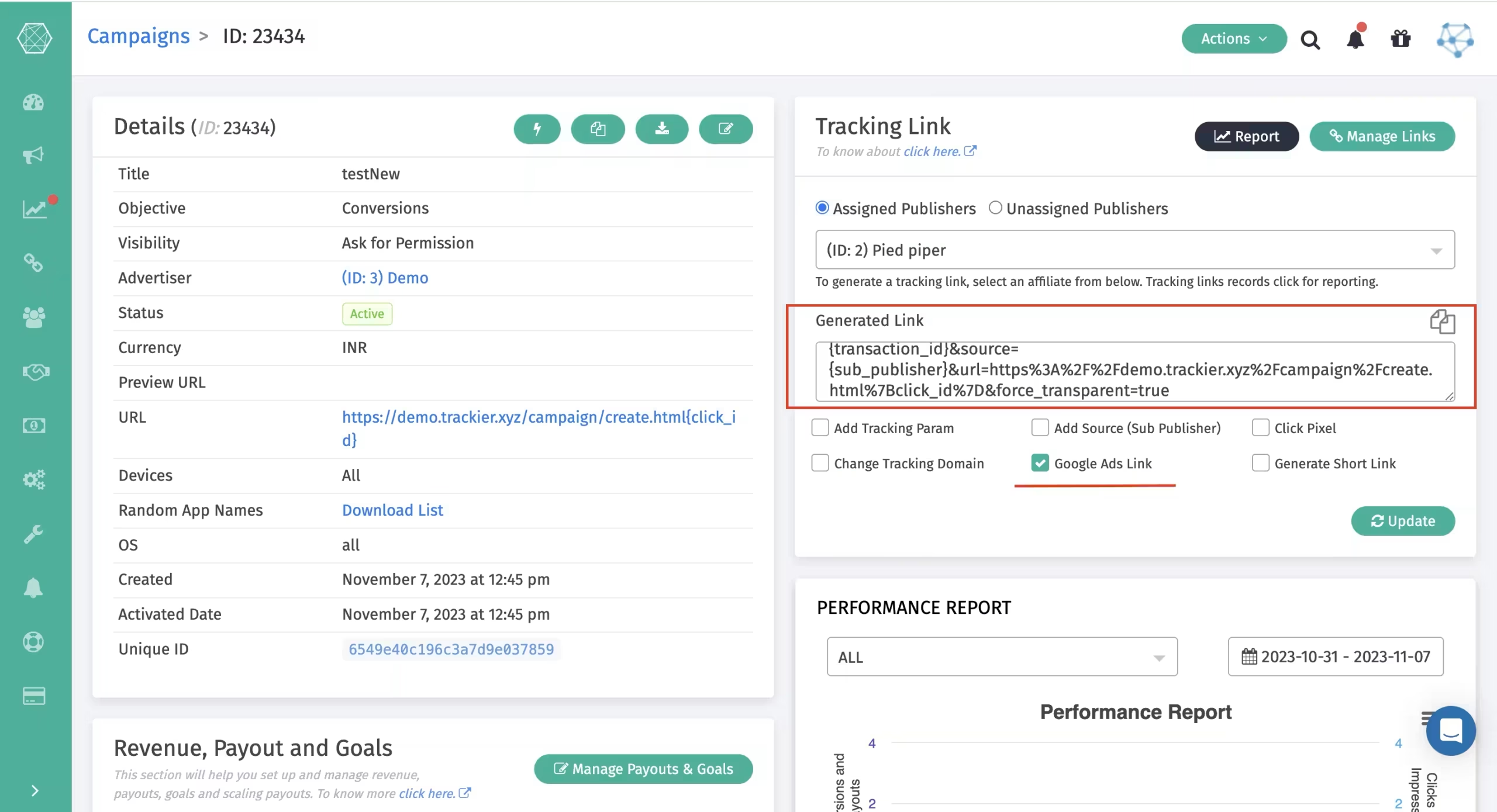
The core of this feature lies in the Ads Link checkbox within the Trackier campaign dashboard. When activated, Trackier generates a link that utilizes certified click trackers.
This ensures that the Final URL in your Google Ad matches the parameters in the Tracking URL, preventing the dreaded “Destination Mismatch” error that can lead to ad disapproval.
2. Google Conversion API (CAPI) Integration
While the tracking link captures the click, the CAPI integration handles the conversion. Trackier acts as a bridge between your server and Google’s servers.
- Server-to-Server (S2S) Tracking: Instead of relying on a pixel to fire in a user’s browser, Trackier sends a postback directly to Google Ads.
- Custom Event Mapping: You can map Trackier goals (e.g., “App Install,” “Subscription,” or “High-Value Purchase”) to specific custom conversion events in Google Ads. This tells Google exactly which clicks resulted in the most valuable actions.
3. Advanced Attribution Accuracy
By capturing the GCLID at the moment of the click and storing it, Trackier ensures that, even days later or on a different device, the credit is attributed to the correct Google Ads campaign, ad group, and keyword.
Setting Up the Google Ads Link
To get the most out of your advertising spend, follow this streamlined workflow within the Trackier platform:
Phase 1: Preparation in Google Ads
Before configuring Trackier, you must define what a “win” looks like:
- Navigate to Tools and Settings > Measurement > Conversions in your Google Ads account.
- Create a New Conversion Action and select Import.
- Choose CRMs, files, or other data sources and select Track conversions from clicks.
- Define your event (e.g., “Lead”) and save the Conversion Name exactly as it appears.
Phase 2: Configuration in Trackier
- Enable the Feature: Go to your Campaign settings in Trackier and look for the Google Ads Link checkbox.
- Activate Deep Linking: Ensure the deep link option is toggled on to support mobile app transitions.
- Map Your Events: Navigate to the Automation > Integration section. Select Google Ads and sign in with your Google account.
- Connect the Dots: Select the custom conversion event you created in Phase 1 and map it to your corresponding Trackier Goal.
Optimizing for Success
Avoiding Destination Mismatches
A common reason for campaign failure is a mismatch between the tracking link and the landing page.
- Rule: Ensure the domain in your Campaign URL matches the one in your Tracking Link.
- Sub-domains: Avoid using different sub-domains in the Google Ads link, as Google’s policy often requires a direct domain match for certified trackers.
Leveraging Real-Time Logs
Trackier provides detailed Postback Logs that show you exactly what data was sent to Google and how Google responded.
- Check the Latency metric to ensure data is flowing quickly.
- Review the Response Body to confirm that Google has accepted the GCLID and recorded the conversion.
Scaling with Publishers
If you work with affiliates or publishers, you can permit them to generate their own Ads-compliant links.
This allows you to scale your reach across multiple partners while ensuring every single click remains compliant with Google’s 2026 tracking standards.
Future-Proofing Your Ad Strategy
The integration between Trackier and Google Ads is more than just a technical bridge; it is a strategic necessity. By moving from browser-based tracking to the Google Ads Link and CAPI framework, you eliminate the “dark zones” in your data.
With Trackier, you gain a 360-degree view of your customer journey, ensuring that every dollar spent on Google Ads is tracked, every conversion is attributed, and every campaign is optimized for maximum ROI.
Need Help?
If you encounter issues with domain whitelisting or GCLID capture, Trackier’s support team is available via the in-platform chat or at support@trackier.com to ensure your campaigns never miss a beat.
How does CAPI help in tracking?
Trackier’s Conversion API uses server-to-server tracking to send conversion data directly to Google Ads. This reduces dependency on browser-based tracking and minimizes data loss caused by ad blockers or privacy restrictions.
How to avoid destination mismatch errors?
To avoid mismatch errors, ensure your tracking link and final landing page share the same domain. Avoid using different subdomains and always keep your URL structure consistent with the guidelines.
Why is server-to-server tracking more reliable than browser-based tracking?
Server-to-server tracking sends conversion data directly between servers, bypassing the browser entirely. This means ad blockers, privacy restrictions, and cookie limitations cannot interfere with your data, resulting in more accurate attribution and fewer missed conversions.
