Not every customer generates the same value. Some make a small purchase, others subscribe to premium plans, and many return for repeat transactions. When commissions are tied to a fixed payout, this variation often leads to inaccurate partner rewards and reduced campaign profitability. That’s where revenue share campaigns come in.
Instead of paying affiliates a flat amount for every conversion, RevShare campaigns calculate commissions as a percentage of the revenue generated from each sale. The result is a more flexible payout model that aligns affiliate incentives with actual business growth.
What is a Revenue Share Campaign?
A revenue share campaign allows advertisers to reward publishers based on the actual revenue generated from every conversion.
Rather than assigning a fixed payout, Trackier calculates commissions dynamically using the revenue values passed by the advertiser through server-to-server postbacks.
This model is widely used for:
- Subscription businesses
- SaaS products
- eCommerce stores
- Fintech platforms
- Gaming offers
- Any recurring or variable-value sales model
Why Fixed Payouts Aren’t Always Enough?
Flat commissions work well when every conversion has the same value. However, modern businesses rarely operate that way.
Different customers purchase different plans, basket values vary, and recurring subscriptions generate revenue over time. In these cases, paying the same commission for every conversion doesn’t accurately reflect the value each customer brings.
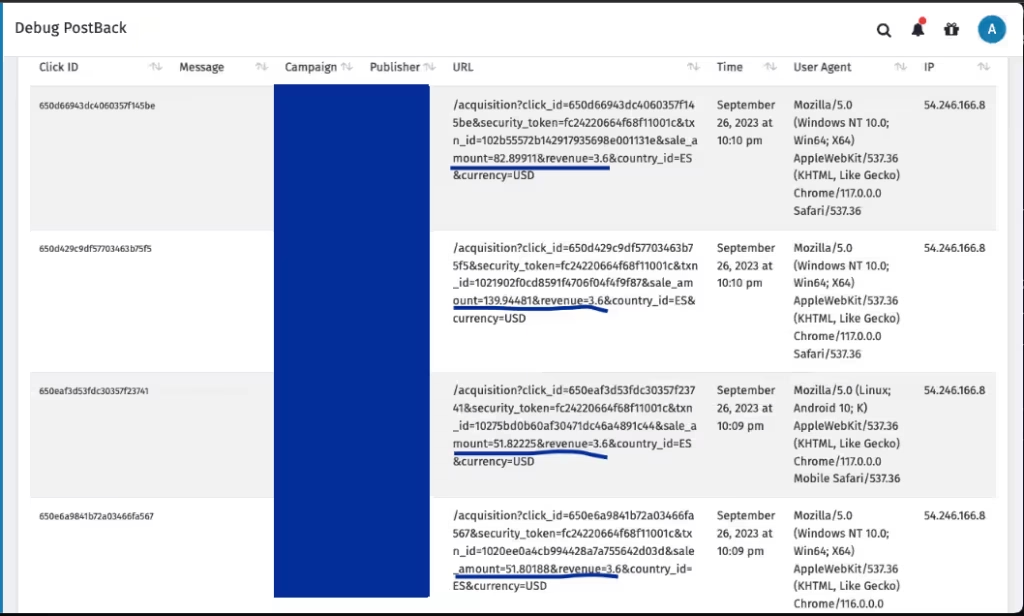
Revenue share campaigns solve this by ensuring publisher payouts increase or decrease based on the actual transaction value.
How Revenue Share Works in Trackier
The process is simple. When a conversion happens, the advertiser sends the transaction details, including the sale amount or revenue, in the conversion postback.
Trackier then:
- Receives the revenue value from the advertiser.
- Calculates the campaign revenue based on your configuration.
- Applies the configured payout percentage.
- Displays the final revenue and publisher payout in conversion reports automatically.
This eliminates manual calculations while keeping reporting transparent for both advertisers and publishers.
Setting Up a Revenue Share Campaign
Configuring a Revenue Share Campaign in Trackier only requires a few steps.
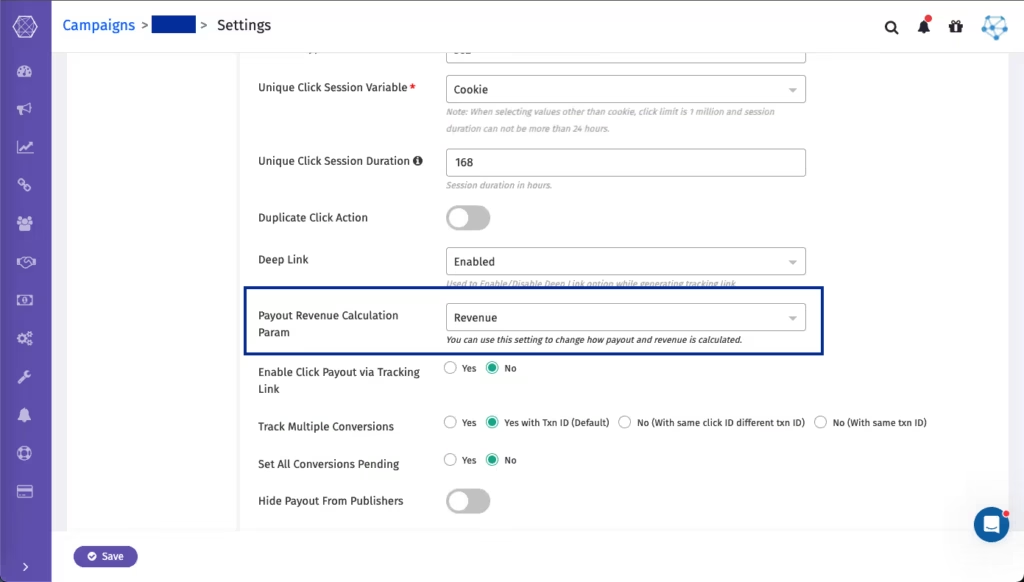
Step 1: Create a CPS Campaign
Within the campaign settings, select “Revenue” as the “Payout Revenue Calculation Parameter”. This tells Trackier to use the revenue received from the advertiser for commission calculations.
Step 2: Configure Revenue
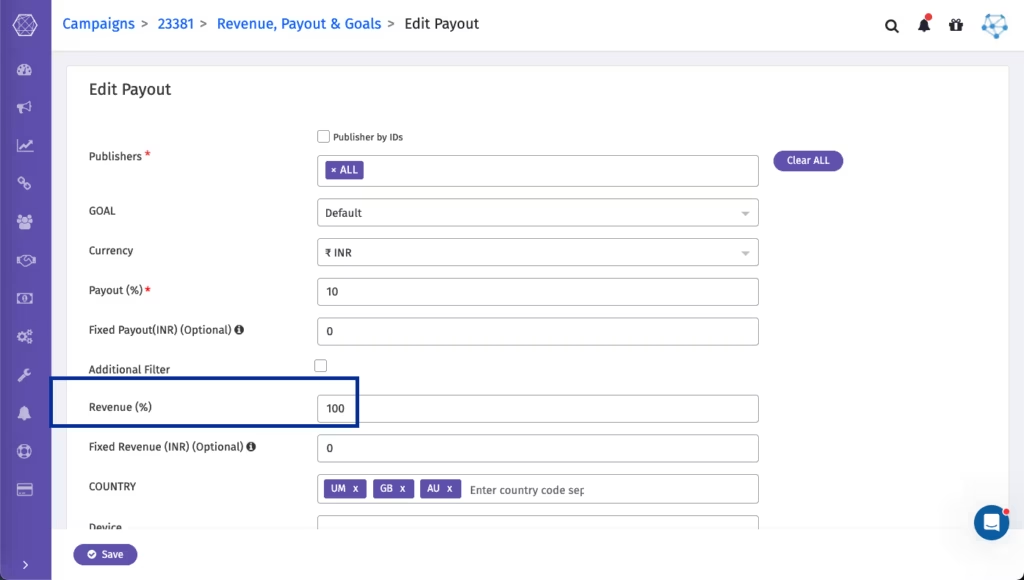
Navigate to “Manage Payouts & Goals”. Set the revenue percentage according to your agreement with the advertiser.
For example:
- Set 100% if the advertiser passes the complete revenue value.
- Configure a different percentage if only a portion of the revenue should be considered.
Step 3: Configure Publisher Payout
Enter the publisher commission percentage in the payout section. Whenever Trackier receives a conversion with revenue data, it automatically calculates the publisher payout based on this percentage.
Example
Suppose an advertiser reports a sale worth $200.
Your campaign is configured with:
- Revenue: 100%
- Publisher Payout: 20%
Trackier will automatically record:
- Sale Amount: $200
- Revenue: $200
- Publisher Payout: $40
No manual calculations are required.
Best Practices
To ensure accurate revenue reporting:
- Verify that advertisers send the correct revenue values in their postbacks.
- Test postbacks before launching campaigns.
- Match payout percentages with commercial agreements.
- Regularly review conversion reports to validate calculations.
Final Thoughts
Revenue share campaigns provide a flexible way to reward publishers while keeping commissions aligned with actual business revenue. Whether you’re running an eCommerce store, SaaS platform, gaming offer, fintech product, or subscription business, this payout model helps automate commission calculations and improves transparency for everyone involved.
By leveraging revenue share campaigns in Trackier, you can build scalable affiliate programs that grow alongside your business.
Need Help?
Setting up a Revenue Share campaign is straightforward, but ensuring that advertiser postbacks, revenue values, and payout percentages are configured correctly is essential for accurate commission tracking.
If you need assistance configuring your revenue share campaign or validating your postback setup, our support team is here to help. Reach out via the in-platform chat or email us at support@trackier.com, and we’ll help you get everything configured correctly.
FAQs
When should I use a revenue share campaign instead of a fixed payout campaign?
Revenue share campaigns are ideal when conversion values vary, such as in eCommerce, SaaS, fintech, gaming, or subscription businesses. Instead of paying a fixed commission, affiliates earn a percentage of the actual revenue generated from each conversion.
How does Trackier calculate publisher payouts in a revenue share campaign?
Trackier uses the revenue amount received from the advertiser’s postback and applies the payout percentage configured in the campaign. The publisher’s commission is then calculated automatically and reflected in the conversion reports.
What happens if the advertiser doesn’t pass the revenue amount?
If the advertiser does not send a revenue value in the conversion postback, Trackier cannot calculate dynamic revenue-based commissions. Ensure the advertiser passes the required sale or revenue amount to enable accurate revenue share tracking.
Can I customize the payout percentage for different revenue share campaigns?
Yes, you can configure payout percentages based on your commercial agreement with each advertiser, allowing you to create flexible commission structures across different campaigns.
Does a revenue share campaign support recurring revenue?
Yes, a revenue share campaign is ideal for subscription and recurring revenue models where customer value varies over time.
