Many advertisers run their campaigns with the help of Impact, a partnership management software. Running a campaign is one thing, but it is of no use if you are unaware of the whats and hows of the campaign. Tracking and reflection on the data, are equally necessary, and that is where Trackier comes into the picture.
One may be using Impact for managing affiliate campaigns and Trackier for tracking performance. However, going back and forth between the two platforms is a tedious process. The two platforms need to talk to each other. This is why a proper impact postback integration is necessary.
Conversions happen on Impact, but do not show on Trackier. As a result, attribution breaks down because the data is not recorded properly, and reports become difficult to understand due to incompleteness. Let us understand how Trackier avoids this with the help of integration with Impact.
What is Postback Integration
Postback integration is a server-to-server (S2S) setup. With the help of this setup, the data does not have to rely on a cookie or browser to track the conversion and make its way to Trackier. These types of tracking are not that reliable anymore.
What happens instead is that Impact’s server sends the conversion data directly to Trackier’s server through a postback URL. All of this happens in –
- Real time
- Automatically
- Without browser dependency
It is like a direct line that connects the two platforms. This way, both Impact and Trackier know a user’s conversion without any lag in time.
What is it Used For?
Once the postback integration between Impact and Trackier is in place, it becomes the backbone of accurate campaign measurement. Specifically, it is used to:
- Track conversions from Impact campaigns directly inside Trackier
- Ensure accurate attribution for both affiliate and influencer campaigns
- Enable real-time conversion reporting without manual intervention
- Move away from browser-based tracking, which is increasingly unreliable
- Maintain consistent performance data across both platforms simultaneously
What You Would Require Before Starting
The integration platform being used here offers partnership management and is used by advertisers and publishers to run affiliate and influencer campaigns.
For this postback integration to work, you need access to your Partner’s portal on Impact. This is where the tracking link gets generated and where the postback gets configured.
For Trackier, however, you would require a global postback URL. This URL can be found in the Trackier panel. It is used to receive conversion data from external platforms.
This requires two major actions.
Action 1 – Generate the Attribution URL on Impact
The role of the attribution URL is to connect a click on your campaign to a specific publisher on Trackier. This URL is generated on Impact and will later be used as the campaign URL under the campaign section when being set up on Trackier.
The steps to get it are as follows-
- Log in to your Partner’s portal on Impact. This is where the tracking link is generated, and postbacks are configured.
- Go to the assets section under the content menu. From the top navigation, select “content”, and you will find an option to view your assets.
- Choose the brand you want to work with. Use the left menu to search for the specific brand for which you are publishing a campaign.
- Choose your landing page. Once you select a brand, you will see a list of creatives and text campaigns. Creative campaigns deep-link into a specific section of the brand’s website, while text campaigns usually land on the homepage. Pick the one that fits your campaign goals.
- Get the tracking link and add Trackier macros. After selecting a campaign, click on the “Get Tracking Link” option. On the right side, you will see fields for tracking parameters. This is where you map Trackier’s macros to Impact’s parameter fields. The most important one is {click_id}. This must be entered against Sub ID 1. The click ID is what ties a conversion back to the original click in Trackier, so skipping this will break attribution. You can also map additional macros depending on what data you want passed back to the advertiser. It must be noted that the tracking link must be saved and copied.
Note: Impact encodes the macros in the tracking URL, which means they will not work correctly if you paste the URL directly into Trackier. You need to decode it first. To do that, use an online URL decoder tool where you must click ”Decode” twice to receive a clean, usable version. This decoded URL is what you use when creating your campaign on Trackier.
Action 2 -Set Up the Postack Integration URL on Impact
The tracking link alone only handles the click side of things. For conversions to flow back to Trackier, you need to complete the postback integration on Impact by setting up a postback that fires every time a conversion event occurs.
In the Impact panel, navigate to “Event Notification,” where you will find a field for “Action Life Cycle” events. This is where you paste the global postback URL from your Trackier panel.
When filling in the postback URL, make sure the Impact macros are correctly mapped to the corresponding Trackier parameters. Here is how they align:
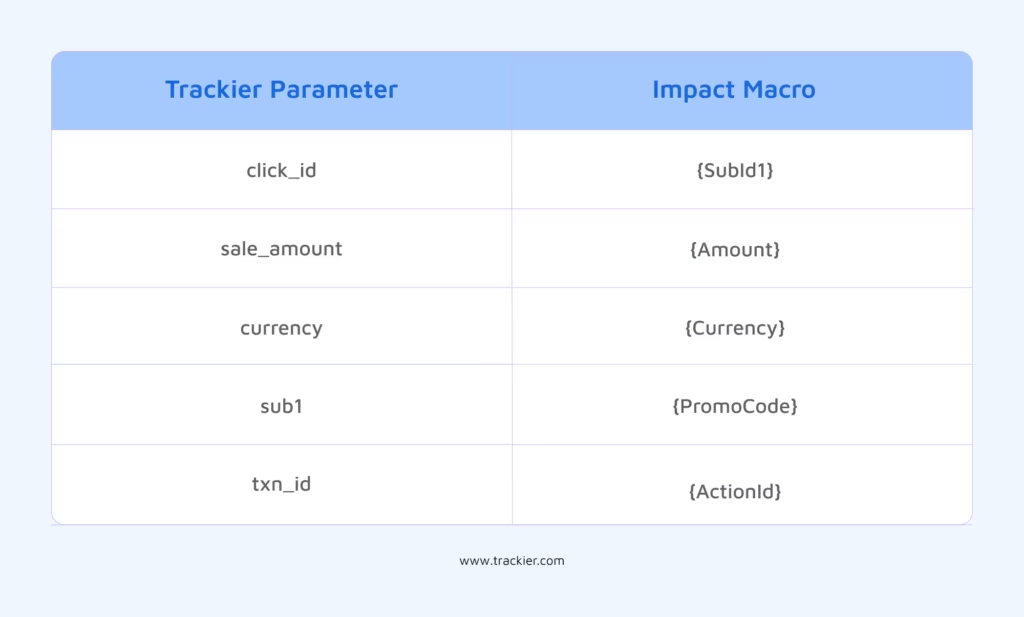
The click_id and {SubId1} pairing is especially important because it is through this that the conversion on Impact is connected back to the specific click tracked in Trackier.
Without this, Trackier cannot attribute the conversion to the right publisher or campaign.
What Happens After the Postback Integration Is Set Up?
Once the attribution URL is live in your Trackier campaign and the postback integration is configured on Impact, everything runs in the background without any manual effort.
- A user clicks the tracking link
- Impact logs the click with the Trackier macros
- The user converts
- Impact fires the postback
- Trackier receives the conversion data and attributes it correctly.
Your Trackier reports will now reflect conversions from Impact campaigns in real time, with full publisher-level attribution intact.
Need Help?
If you run into any issues while setting up the postback integration or configuring tracking on Trackier, our support team is available via the in-platform chat or at support@trackier.com. We will make sure your conversions are never left unattributed.
FAQ
What is postback integration, and why is it better than pixel-based tracking?
Postback integration is a server-to-server method of passing conversion data between platforms. Unlike pixel-based tracking, it does not rely on a user’s browser or cookies, making it significantly more reliable. Especially as browsers continue to restrict third-party cookies.
Is postback integration between Impact and Trackier a one-time setup?
Yes. Once the attribution URL is configured on Impact and the global postback URL is added to the Event Notification section, the integration runs automatically. Every conversion from that point onward is sent to Trackier in real time, with no manual effort.
Can postback integration support multiple publishers running on the same Impact campaign?
Yes. Since each publisher gets their own tracking link with unique click IDs, Trackier can accurately attribute conversions to the right publisher even when multiple publishers are running on the same campaign simultaneously.
What happens if the {click_id} macro is not mapped correctly during postback integration?
If {click_id} is not mapped against Sub ID 1 on Impact, Trackier will not be able to tie the conversion back to the original click. This means attribution breaks entirely. The conversion will be recorded but cannot be linked to the correct publisher or campaign.
