Businesses that manage partner marketing, affiliate programs, and performance campaigns security has become a top priority for them.
Brands need to have the ability to ensure that the individuals who are granted access to sensitive information have been granted this access appropriately as the organization grows and the number of people with access to the organization’s platforms increases.
To assist organizations in improving their platform’s security methods while lowering their operational risk, May 2024 product updates provide brands with a “Security Control” module that allows them to define, manage and enforce security policies throughout their accounts.
These security settings (i.e., login protection, password/security processes, session controls, and other controls regarding the security of an account) give organizations the ability to create a more secure environment for partner operations and for managing affiliate and partner campaigns.
Importance of Security Controls
Every day, marketing platforms process large quantities of confidential information, including campaign-related database records, user credentials, financial data, partner information, and performance reports.
Without proper security controls, organizations face risks of unauthorized access to the account, credential theft, forceful login attempts, data exposure, operational disruptions, and many compliance challenges.
Security Control Settings provided by Trackier help organizations proactively mitigate these risks while ensuring secure and efficient access to their platform for the entire organization.
When businesses implement security controls, they protect campaign data and reduce the possibility of unauthorized access, enhance team-wide account security, facilitate compliance with their own internal policies/procedures, and build better trust with advertisers, affiliates, and partners.
Security Control Features of Trackier
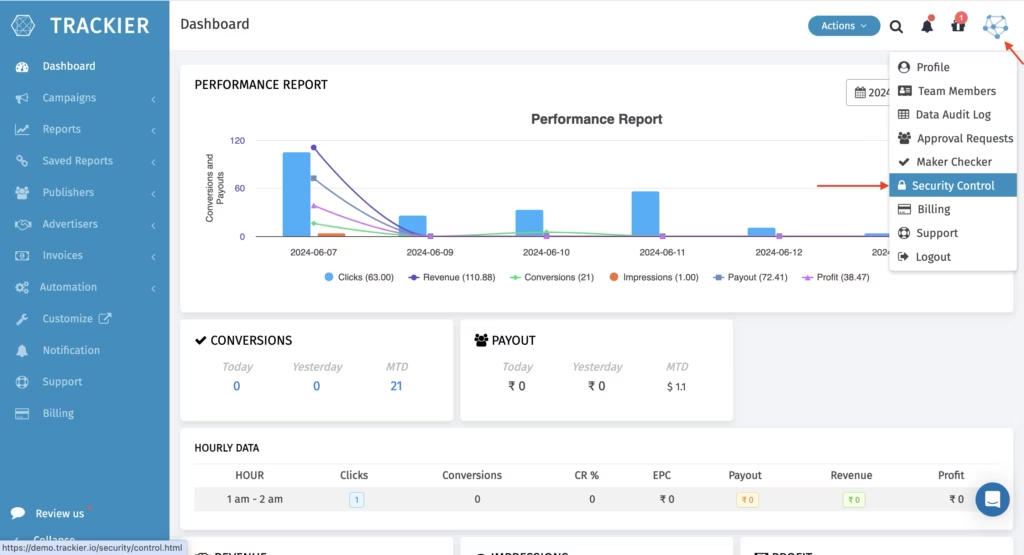
Trackier has several available security features to modify and secure the usage of the platform according to the needs of the organization.
1. Two-Factor Authentication (2FA)
Users will be able to add a second security measure when they log in by entering their password.
If a user’s login credentials are compromised, they will not be allowed to access the account as they will have to complete an additional verification before logging in.
How does it work?
- Enter the username and password to log in.
- An email will be sent with a verification code.
- Once the code has been entered correctly, access will be granted.
Benefits
- Preventing unauthorized access to an account
- Reducing risks associated with credential-based security (passwords), followed by
- Adding additional layers of protection to sensitive account information
2. Session Timeout Settings
Extended length (i.e., long time periods) of being logged into an account leads to a security threat, especially for users who share a computer or are away from their desk.
To counter this, the administrator can establish session timeout limits that will automatically log the user out after not using the computer for a specified period of time.
The organization can establish inactivity limits of:
- 10 minutes
- 20 minutes
- 30 minutes
Benefits
- Preventing unauthorized access to an account through an unattended log-in session
- Reducing exposure associated with shared workstation use
- Improving overall account security
3. Policy Management for Passwords
Cyber attacks can still use passwords to create security vulnerabilities by using users’ weak or reused passwords as their primary means for gaining access.
By implementing Trackier’s “Password Policy Management”, admins can ensure that all passwords used across the platform are strong.
Security controls include minimum length of password, upper case and lower case characters, must have a number, must have a symbol, and password rotation policy.
Benefits:
- Create stronger user credentials
- Minimize your organization’s vulnerability to password attacks
- Support your organization’s security standards
4. Access Protection Policy
The number of attempts made for logging in a user can indicate brute-force attacks or attempts at unauthorized access.
To protect accounts from unauthorized access, Trackier’s Access Protection Policy will automatically restrict access to an account for a defined number of failed logins.
Process
- All failed logins are tracked for an account
- An account will be temporarily locked out once the established number of failed logins is reached
- An administrator will review an account’s activity and issue an unlock when needed
Advantages
- Brute force attacks are blocked
- Suspicious login activity is detected
- Repeated attempts at unauthorized access are prevented
Building a More Secure Partner Marketing Operation
Implementing security is not just something you do once; it’s an ongoing process that supports protecting your most valuable assets (business-related data), compliance with the laws of your industry, and avoiding operational risks.
Trackier has developed a full suite of “Security Control” features so that you can increase account protection and ensure that the responsibility for managing user access is placed with the appropriate person and that everyone has a safe working environment, including advertisers and affiliates and internal teams.
By combining strong access controls, authentication measures, password policies, and continuous monitoring, businesses can focus on scaling campaigns and partnerships while maintaining confidence in the security of their operations.