When you run a campaign with multiple conversion events, not every event needs to trigger a publisher notification. Postback settings in Trackier give you control over exactly which goals fire postbacks to which publishers, so your attribution stays clean and your payouts go where they should.
This guide walks you through what postback settings are, why they matter, and how to configure them correctly inside Trackier.
What Are Postback Settings?
In performance marketing, a postback is a server-to-server signal that fires when a tracked event occurs. When a conversion happens on your campaign, Trackier sends that signal to the publisher responsible for the traffic. This is how publishers confirm that their traffic converted, and how payouts get triggered.
Postback settings work at the campaign level. They let you decide which conversion goals should communicate with publishers and which ones should stay internal. This is especially useful when your campaign tracks several events across a user journey, but only one or two of those events should actually result in publisher notifications or payouts.
Multi-event campaigns are common across industries. A fintech app might track Registration, KYC Completion, and First Deposit as separate goals. An e-commerce brand might track Add to Cart, Checkout, and Purchase.
A gaming platform might track install, Tutorial Completion, and In-App Purchase. In all of these cases, you may want to attribute the full journey internally while only sharing specific milestones with publishers.
Why Postback Settings Matter
Without proper postback configuration, every tracked goal in your campaign fires a notification to the publisher by default. On the surface, that sounds harmless. In practice, it creates several problems.
The first issue is payout accuracy. If your campaign is set up to pay on Purchase but your publishers are also receiving postbacks for Add to Cart or Registration, it creates confusion in their reporting and, depending on how their systems handle incoming postbacks, can lead to incorrect payout claims or discrepancies during reconciliation.
The second issue is optimization quality. Publishers use postback data to optimize their traffic sources. If they receive signals for events that are not tied to actual value delivery, their optimization algorithms work off incomplete or misleading signals. That means the traffic quality you receive over time can degrade, even when your own tracking looks fine.
The third issue is reporting clarity. When your Trackier dashboard shows goal completions alongside postback activity, mismatched settings mean your internal data and publisher-side data tell different stories. Investigations into discrepancies often trace back to goals that should have been blocked at the source. Trackier’s postback settings exist specifically to solve these problems before they start.
A Real-World Example
Say you are running a CPI campaign for a mobile app. The campaign has two goals configured: Install and Transaction. Your payout structure is based on the Transaction event, because that is where actual revenue is generated. You do not want to pay publishers for installs, and you do not want them to receive install signals that might inflate their reported conversion counts.
Without touching postback settings, both the Install and Transaction postbacks fire to every publisher by default. By going into postback settings and blocking the Install goal for all publishers, or configuring it so only the Transaction goal is allowed, you ensure publishers only receive the signal that matters.
Your internal reporting still captures the Install data, but publishers are working from the same data point that your payouts are based on. This kind of setup is standard practice for campaigns with tiered goal structures or multi-step conversion funnels.
How to Access Postback Settings
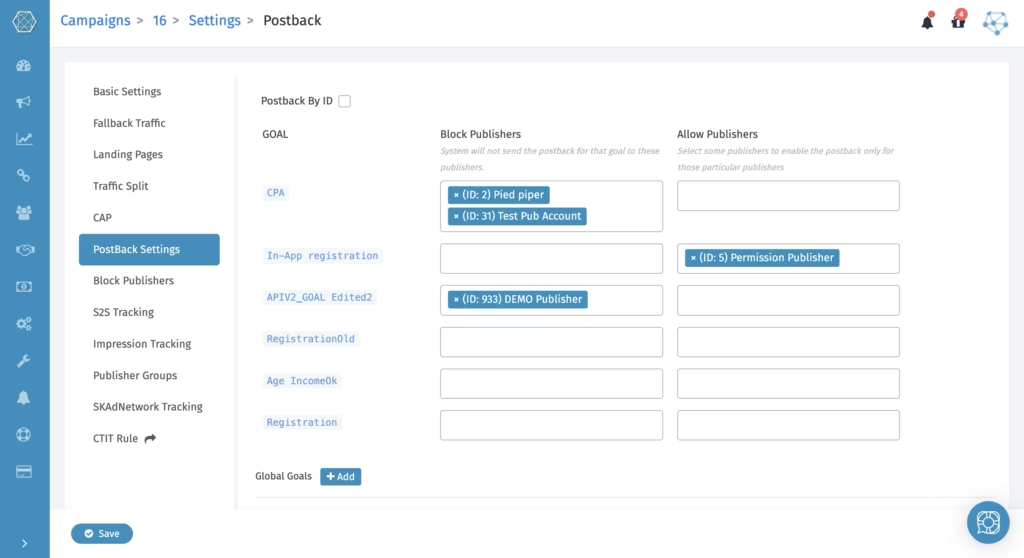
Navigate to the specific campaign you want to configure inside your Trackier dashboard. Open the campaign settings and select the Postback Settings tab. The interface will display your configured goals alongside two columns: Block Publisher and Allow Publisher.
How It Works
By default, every publisher on a campaign receives postbacks for conversions and any public goals, as long as the publisher’s postback URL has been set up correctly. The postback settings let you override that default behavior on a per-goal, per-publisher basis.
Here is how each option functions:
Block Publisher
When you add a publisher to the Block Publisher column against a specific goal, that publisher will not receive the postback for that goal. Every other publisher on the campaign continues to receive it as normal. Use this when you want to stop a specific publisher from receiving a particular conversion signal without affecting anyone else.
Allow Publisher
When you add a publisher to the Allow Publisher column against a specific goal, that publisher becomes the only one who receives the postback for that goal. All other publishers are excluded from that goal’s postback. Use this when a conversion event is only relevant to one specific publisher or traffic source, and sharing it broadly would create reporting or payout issues.
These two settings give you both exclusion logic and allowlist logic without requiring you to duplicate campaigns or restructure your offer architecture.
Best Practices for Postback Settings
A few things worth keeping in mind as you configure these settings:
- Always align the settings with your payout structure. If a goal does not trigger a payout, consider whether publishers need to receive it at all. Blocking non-payout goals keeps publisher reporting focused on what actually matters.
- When onboarding a new publisher to an existing campaign, review the settings before they go live. If the campaign has goals blocked for all other publishers, confirm whether the new publisher should be subject to the same restrictions or added to an allowlist.
- If you notice postback discrepancies with a specific publisher, check their settings first. A misconfigured block or allow rule is often the reason a publisher reports missing conversions or receives unexpected signals.
- Document your postback configuration as part of your campaign setup process. When campaign managers change or when campaigns run for extended periods, having a record of which goals are blocked or restricted saves significant troubleshooting time later.
Postback Settings and Campaign Accuracy
Postback settings are a small configuration step that carries significant weight in how your campaign data aligns with publisher records. Getting them right means fewer disputes, cleaner reporting, and publisher optimization that actually points in the right direction.
For campaigns running a single goal with straightforward payouts, the default settings may be sufficient. But as soon as your campaign introduces multiple goals or a tiered payout model, configuring postback settings should be a standard part of your campaign launch checklist.
Trackier gives you the controls to make this precise. Using them correctly is what keeps your performance data working for you, not against you.
FAQs
What are postback settings in Trackier, and why do they matter?
Postback settings in Trackier let you control which conversion goals send notifications to publishers on a per-goal, per-publisher basis. They matter because without proper configuration, every tracked goal fires a postback to all publishers by default, which can lead to payout inaccuracies, degraded traffic quality, and reporting discrepancies between your internal data and publisher-side records.
Where can I find postback settings for a campaign in Trackier?
To access postback settings, navigate to the relevant campaign in your Trackier dashboard, open the campaign settings, and select the Postback Settings tab. From there, you will see all configured goals listed alongside the Block Publisher and Allow Publisher columns.
