
December 2024 product updates introduce enhanced reporting flexibility with the ability to add custom columns to Trackier reports. This improvement allows performance marketers, affiliate managers, and data teams to create personalized report views using custom formulas based on existing data fields.
With the complexity of many performance marketing campaigns, teams often require better insights than what default reporting metrics provide. By using the custom column functionality, Trackier will give users the ability to tailor their reports to their specific analytical needs. This will help teams produce more meaningful insights from their reports and make faster data-based decisions.
Introducing Custom Columns in Reports
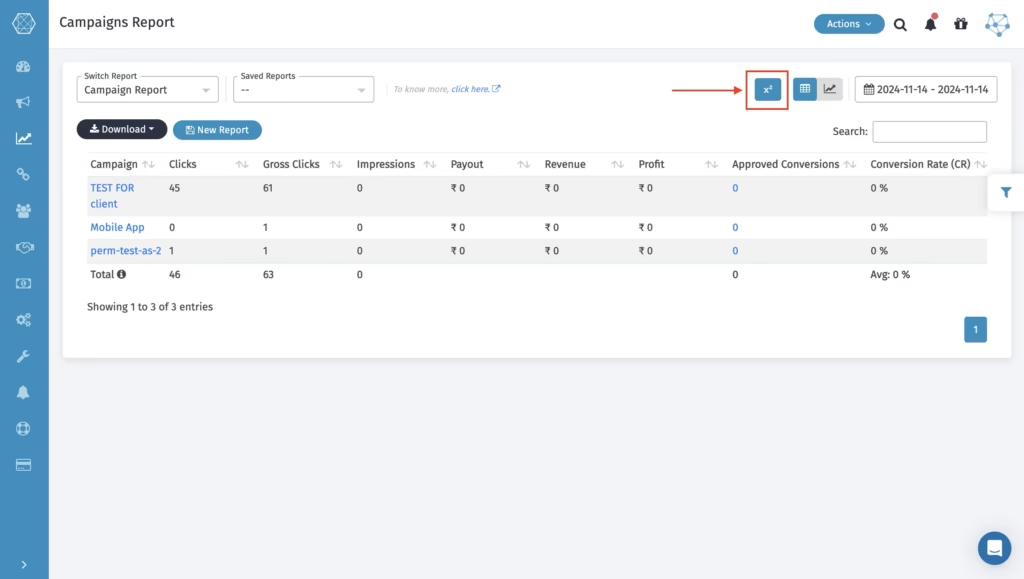
Trackier has now provided users the ability to create custom columns in their reports by using formulas created from existing data fields. Rather than using only standard metrics as the basis for calculating values, the teams are able to use multiple data points to create their own custom calculations and have them all displayed in a single column.
For example, users can calculate total conversions by combining different metrics such as:
- Approved Conversions
- Pending Conversions
By applying simple formulas like Approved Conversion + Pending Conversion, teams can instantly generate a new metric that better reflects campaign performance.
With this type of flexibility, marketers will be able to create reports that are specifically tailored to their unique performance Tracking needs.
Reports Where Custom Columns Are Available
Custom columns can be applied across multiple reporting views within the Trackier platform, including:
- Campaign Reports
- Publisher Reports
- Advertiser Reports
- Daily Reports
- Hourly Reports
- Goal Reports
- Smart Link Reports
- Manager Reports
- OS Reports
- Custom Reports
This broad availability ensures teams can maintain consistent analysis across different reporting dashboards.
Flexible Formula-Based Reporting
When creating a custom column, users can configure several parameters:
- Column Name – Define a name for your metric clearly enough to understand what you are measuring.
- Expression (Formula) – Build a formula using available reporting fields and mathematical operators.
- Currency Display – Enable or disable currency display for fields that include revenue or payouts.
- Comma Formatting – Control whether numerical values are displayed with comma separation for easier readability.
Once the formula is applied, the report automatically updates and displays the calculated metric alongside existing performance data. Users can also create multiple custom columns within the same report, enabling deeper and more structured performance analysis.
Why Does This Update Matter?
Performance marketers rely heavily on reporting to optimize campaigns, identify trends, and evaluate partner performance. However, default metrics do not always reflect the exact insights teams need.
By enabling custom column creation, Trackier allows users to transform raw campaign data into custom performance indicators tailored to their workflows.
This improvement helps teams:
- Analyze campaign performance more effectively
- Create custom KPIs based on business needs
- Reduce manual calculations outside the platform
- Build more meaningful and actionable reports
With greater flexibility in reporting, marketers can focus more on optimization and strategic decision-making rather than data preparation.
Continuing to Improve Data Visibility
With the December 2024 Product Updates, Trackier continues strengthening its reporting capabilities to support modern performance marketing teams.
Custom columns provide an additional layer of analytical control, enabling users to turn standard reports into powerful data insights tailored to their unique campaign strategies.
More enhancements and integrations are planned as Trackier continues evolving its platform to deliver smarter, more flexible marketing analytics.