If what you share online is being rejected, it means that Google does not approve of it. This is especially the case with Google Ads.
You set your campaign, generate a tracking link, and launch your Google Ads, but it gets rejected. The issue is not with the campaign, nor is it with the Trackier platform itself. The problem is that Google does not approve the Google Ads tracking domain.
A Google click-tracking certification is necessary here. This article elaborates on what it is, why it exists, and how to get your ad-tracking domain whitelisted.
Why Do Google Ads Tracking Domains Get Rejected?
Google does not allow just any domain to redirect users through tracking links in its ad network. Hence, if an ad’s click path goes through an unrecognized third-party domain before reaching the final URL destination, Google might flag it as uncertified and eventually reject it.
This policy is necessary because redirects that are hidden or non-transparent have been potentially used for ad fraud, phishing, and user deception. To avoid these fraudulent activities altogether, Google built a certification process. The aim is to ensure that transparency standards for every Google Ads tracking domain are met; only then is the click path permitted.
Hence, to be able to run your ad through a whitelisted domain with the help of Trackier, the domain needs to first be part of Google’s approved list.
Check Your Tracking Domain
If you are using Trackier’s default tracking domain, gotrackier.com, you do not need to do anything. Google already whitelists this domain. Subdomains on gotrackier.com are also covered.
The whitelisting requirement is only relevant for those who have an independent domain setup.
If you are unsure whether you are using a custom domain, check your campaign tracking links. If the domain in the tracking URL is not gotrackier.com, the process is likely meant for you.
Who This Applies To
This process is relevant if you are:
- Running Google Ads with a custom tracking domain
- Seeing “Uncertified Click Tracker” policy violations in your Google Ads account
- Using an independent tracking domain with Trackier
What Google Checks
Before approving the Ad domain, Google ensures that certain core requirements are being followed. These requirements are-
- Visible redirect parameters: The tracking URL must show where it is redirecting the user. There should be no hidden or obfuscated destination.
- The force transparent parameter: Google requires that your tracking links include force_transparent=true as a parameter. This signals to Google that the redirect chain is open and visible.
- No hidden backend redirects: The redirect path must be consistent and traceable. If your URL behaves differently in a browser than it does when inspected, it will fail review.
- Complete business information: The certification form asks for company details, a privacy policy URL, and examples of live tracking URLs. Incomplete or inconsistent information is one of the most common reasons for rejection.
For the full set of requirements, refer to Google’s official click tracker guidelines.
Application Window Deadline
It must be noted that Google processes certifications for a specific period of time each year, and that is from September 1 to November 30. Google has updated the certification process, and the older public form may no longer accept responses.
If a certain campaign launch is time-sensitive and the window has passed, the options get narrow. What must be done in this scenario is –
- Contact your Google Ads account manager directly and explain the urgency.
- Reach out to Google Ads support and request guidance on off-cycle submissions.
- In the meantime, one may also switch to Trackier’s default gotrackier.com domain to keep campaigns running while you wait for the window to reopen.
However, planning the Google Ads tracking domain before September is suggested. This way, there is room for –
- Document preparation
- Testing the tracking URLs
- Avoiding last-minute scrambles
Filling Out the Certification Form
To begin, fill out Google’s certification form with all domains you wish to have whitelisted. If Google is no longer accepting responses (outside the Sept–Nov window), contact your Google Ads representative or support team directly.
- All domains in one submission. Google reviews your domains as a batch. If you submit five domains today and realize you missed a sixth, you would need to wait for the next review cycle. Audit your tracking setup thoroughly before submitting.
- A working example of a tracking URL. The form asks for a live, working example of a click tracker used by your customers. Make sure the URL you submit is active and follows the transparency requirements, including the force_transparent=true parameter.
- Your privacy policy URL. The domain’s privacy policy needs to cover the tracking activity. If your privacy policy does not explicitly address click tracking or data handling for advertising purposes, update it before applying.
- Request type. If you already have Google certification for some domains and are adding new ones, select “Yes” for the request type. If this is your first time applying, select “No.”
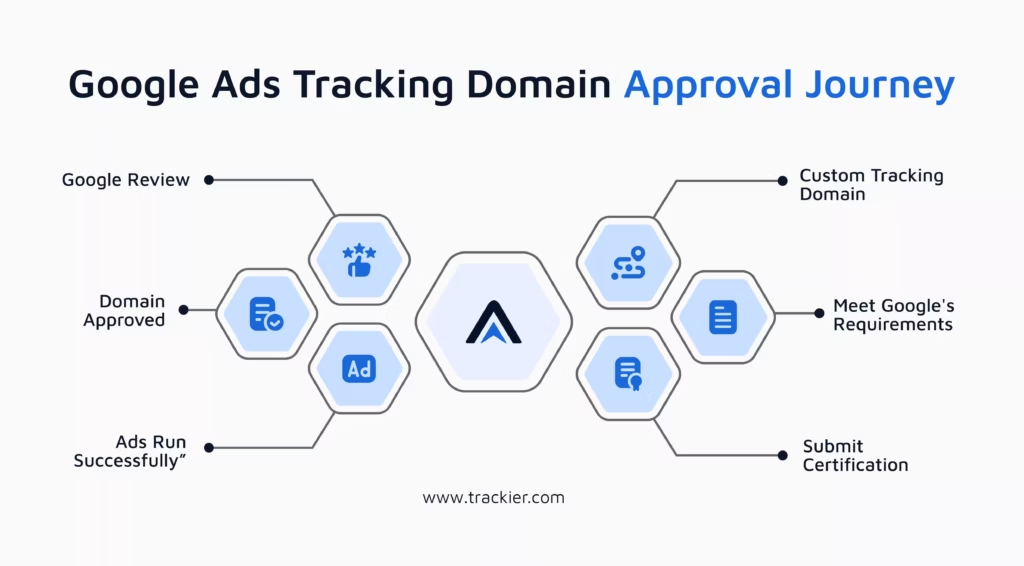
Form Section Walkthrough
The certification form covers the following sections –
- Request type: If you already have a Google certification and are adding new domains, select “Yes.” First-time applicants should select “No.”
- Company details (next 13 questions): These cover your company name, contact information, and product details. Fill them in as applicable to your business.
- Are advertisers already using your click-tracking service on Google Ads? Both agencies and brands using Trackier should answer “No” here, as they are not themselves a click-tracking software provider.
- Privacy policy URL: Provide the URL of your privacy policy. It must cover the tracking activity your domain performs.
- Does your privacy policy cover these new domains? Select “Yes.” If not, Google will request changes before proceeding.
- Domains to certify and a working tracking URL example: Provide all domains you wish to certify, along with a live click tracker URL currently in use.
- Do you comply with Google’s transparency guidelines? Select “Yes.”
- Is the domain in public registration? Answer based on your setup. This is relevant for domains with GDPR or regional registration restrictions.
What Happens After the Submission?
Google typically responds within 7 to 10 working days. Once the Google Ads tracking domain is approved, it is added to the certified trackers list, and campaigns can run without policy violations.
You can verify whether your domain is already on the approved list by visiting Google’s Certified Click Trackers page.
There are also chances that the application can be rejected, the reasons behind this could be –
- Redirect chain was not fully transparent when Google tested it
- Tracking URLs behaved inconsistently during review
- Business information was incomplete or mismatched
- The privacy policy did not adequately cover the tracking activity
In case of rejection, review the specific reason Google provides, correct the issue, and resubmit during the same window or the next one.
To Wrap It Up
If you want to use a Google Ads tracking domain, you need to meet Google’s certification requirements, irrespective of the platform that is being used.
Trackier is designed to comply with these standards, with redirect chains and an already set tracking link.
The purpose of showing the certification is that a business is genuine and that the data is handled in a transparent manner. If everything is set up right with Trackier, all you need to do is submit the required info at the right time. Once you’re approved, you won’t have to worry about rejections or policy issues later on.
Need Help?
If you run into any issues during the domain whitelisting process or need guidance on setting up your tracking URLs correctly on Trackier, our support team is available via the in-platform chat or at support@trackier.com. We will make sure your Google Ads campaigns are running without any policy violations.
FAQ
Do I need to whitelist my Google Ads tracking domain if I am using gotrackier.com?
No. Trackier’s default domain is already whitelisted. You only need to apply if you are running campaigns through a custom independent tracking domain.
What happens if I miss the September–November window?
You will need to either wait for the next window or contact your Google Ads account manager to explore off-cycle options. In the meantime, switching to gotrackier.com, which is already a Google Ads tracking domain, keeps your campaigns running.
Can I add domains to an existing certification later?
Yes, the Google Ads tracking domain certificate provides a “request type” option for adding new domains to an existing certification. The same window applies, so batch all domains you anticipate needing before you submit.
What should I do if my tracking links are getting flagged even after whitelisting?
Start by checking the Postback Debug Report in Trackier under Advertiser > Postback Hit Received to rule out any tracking configuration issues. Then verify that your live tracking URLs still include the force_transparent parameter.
