When platforms are able to share performance data of affiliates and e-commerce more easily through direct communication, it leads to far more effective management of those affiliate/e-commerce performance data.
The Amazon integration within Trackier simplifies the process by which advertisers and performance marketers can track and validate conversions attributed to affiliate-based traffic from Amazon.
This enhancement extends Trackier’s capabilities for automation by providing direct access to conversion data through Amazon, eliminating manual reconciliation activities between Amazon and the advertiser, and enhancing the accuracy of campaign performance reports.
What the Amazon Integration Solves
Before the integration, Amazon affiliate marketers had to perform time-consuming manual comparisons of the Amazon reports and Trackier click data, which often resulted in mismatches between the two systems, especially for large campaigns.
Now, with the Amazon integration, conversion data is pulled automatically and associated with click IDs, allowing you to record only valid, tracked conversions in the system while excluding organic conversions.
The integration covers the gap between Amazon’s affiliate reporting system and Trackier’s attribution, creating one point of reference for measuring performance.
Key Highlights of the Integration
The function of the Amazon integration offers better efficiency for tracking affiliates’ success by:
- Automation of retrieving conversion measurements from Amazon’s reporting
- Tracking conversions directly to Trackier click IDs in real-time
- Allows all clicks, conversions, and revenue to be monitored in the Trackier dashboard
- Ability to filter out organic conversions – i.e., have been made without tracked clicks
- Enables accurate reporting of what affiliation sales are being generated by affiliates
- Provides a visual representation of both successful and unsuccessful conversions through conversion log entries.
When an Amazon transaction occurs, the system will first check if a Trackier Click ID was associated with that transaction.
If so, a conversion will be recorded; otherwise, it will be an organic conversion and not have attribution credits given towards it.
By using validation of actual conversions, advertisers using the Trackier platform through the Amazon integration can rely on uninflated and unverified performance data when reporting their results.
The Amazon Integration Process
To integrate with Amazon, Trackier uses the conversion fetch API to obtain a structured list of conversion events.
Each transaction will have a click ID (if available), and this is used as the primary matching way within Trackier. The process works in the following manner:
- Amazon creates a report that includes all conversions
- The report is pulled into Trackier via the integration
- Each conversion record is checked to see if it has a valid click ID
- If there is a matching click ID in Trackier, it is considered a conversion
- If there is no click ID, it is considered an organic conversion and is not tracked in Trackier
- The conversion data is then mapped in Trackier’s dashboards
In addition, the conversion data from Amazon can sometimes be substantially delayed. Trackier will automatically match the proper date of a conversion so that it is recorded on the actual date of the transaction and not the date the report was pulled into Trackier.
Setup Process
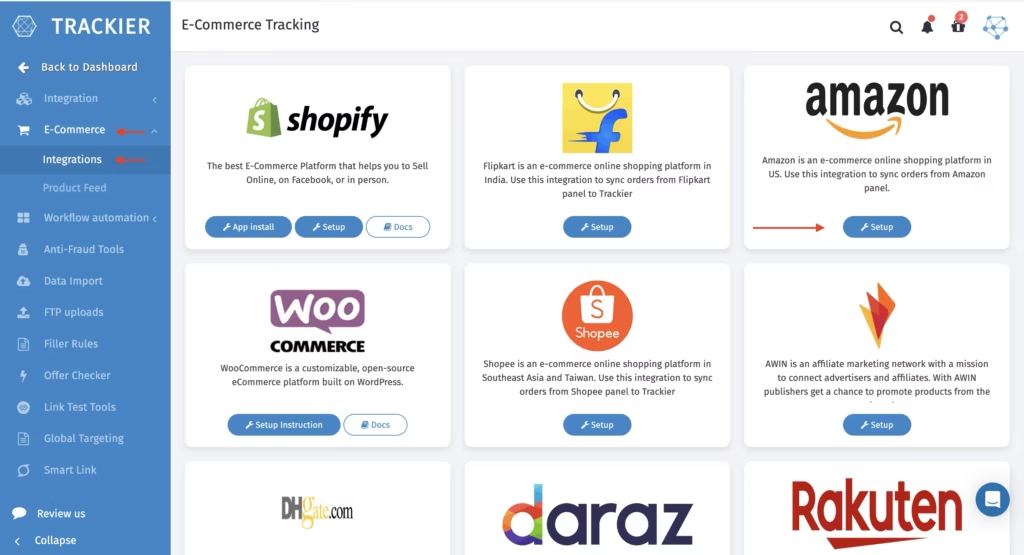
Setting up the Amazon integration in Trackier is straightforward and can be done from the automation section. It takes several steps:
1. Go to Automation > E-Commerce > Integrations in your account
2. Find and select the Amazon Integration
3. Turn on the integration by moving the toggle to the “On” position
Once you have turned on the integration, you will need to get the username, password, and store ID from Amazon to complete the integration setup:
- The username can be obtained from the Amazon support centre.
- The password will be provided to you by the Amazon support centre, separate from your own login details.
- You can find your store ID within your Amazon Associates account dashboard.
After completing your setup, the store ID must be added to the tracking URL as the tag parameter. Example: https://www.amazon.com?tag=your-store-id&ascsubtag={click_id}
This will allow the click tracking information at the click level to pass back to Trackier so that it
can be properly attributed.
Benefits for Advertisers and Affiliates
Teams that operate affiliate programs using Amazon services will see operational and analytical improvements through the new integrations:
- Decreased dependency on manual reconciliation across platforms
- Increased accuracy in ROI and revenue attribution
- Decreased “Time to Report” due to automated ingestion of data
- Improved ability to filter for fraud and assess organic traffic
- Increased transparency into affiliate partner performance
Final Thoughts
The Amazon integration within Trackier adds to its e-commerce tracking ecosystem by creating a seamless way to fetch conversions, a way to accurately attribute clicks to sales, and a way to automate reporting.
Advertisers who are currently running Amazon affiliate programs will see a decrease in their overall operational support while improving the reliability of the data that they are working with.
They will no longer have to manage multiple reports and have to manually validate that data; they will now be able to rely on one integrated solution that provides them with clean, structured, and actionable performance data.