To scale performance marketing campaigns, managing the budgets of advertisers is becoming a key consideration. Without budget control measures, campaigns may run through budgets quickly, making it difficult for teams to maintain control over finances and have efficient campaigns.
The November 2024 product update introduced Trackier’s Advertisers Wallet Budget Capping Module, enabling advertisers to more effectively manage their expenditures on campaigns while continuing to run their ad campaigns.
With the ability to set maximum budgets, advertisers will be able to prevent their campaigns from exceeding their targeted expenditure and allow advertisers to continue to have predictable and manageable financial planning.
What is the Advertiser Wallet Budget Capping Module?
Advertisers can set pre-determined campaign budget limits through the Budget Control Module (budget cap) of the wallet, so when a budget reaches depletion, the wallet will restrict additional traffic from being tracked and will show a message corresponding to the wallet being depleted.
Advertisers benefit from having complete visibility and control over their campaign budgets to ensure that costs do not exceed pre-determined spend limits.
The Budget Control Module is particularly useful to advertisers who:
- Operate multiple campaigns at once
- Require strict control over their budget enforcement
- Desire to test the performance of their campaigns without going over budget
- Want the ability to better track the financials of their campaigns through tracking systems
By adding wallet-level budget management, Trackier allows advertisers to maintain control of their campaign costs while gaining greater transparency into their operations.
How Budget Capping Works in Trackier?
The advertiser’s budget will be monitored by the system continuously to determine how much of the total possible spend (the ‘wallet balance’) has been spent.
Once the wallet balance has reached the amount the advertiser has set as the limit, the system will return an error message for any additional tracking link activity (indicating that the wallet has been fully used and no additional charge can be incurred for that tracking link activity).
Trackier also refreshes the wallet data once every day at 11:59 PM.
For example, if an advertiser’s budget has been completely used by 10:00 AM, the advertiser will still be able to run their campaign until 11:59 PM on that day (and it will continue to count towards the advertiser’s budget until then).
Therefore, there will be no issues with an advertiser stopping their campaign due to exceeding the amount of their budget until Trackier refreshes all wallet data at 11:59 PM.
Where to Find the Advertiser Wallet Budget Tool?
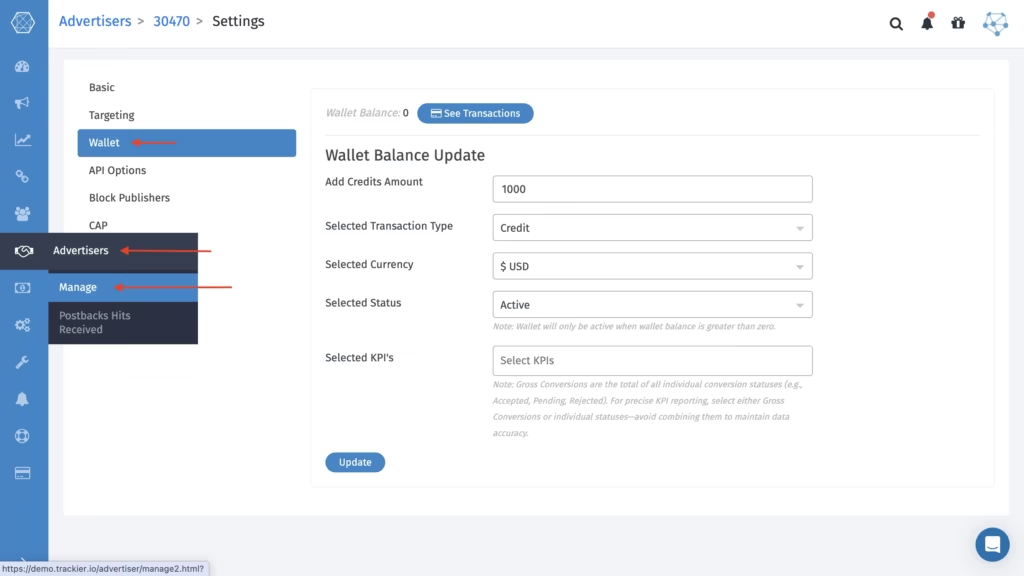
It is easy to create a wallet budget rule inside the Trackier dashboard. To access the module:
- With the Trackier dashboard open, go to the Advertiser tab.
- Select Manage, and then pick the Correct Advertiser.
- Go to Settings.
- In the Wallet tab, click Edit to get into the Wallet tab.
This is where you can set up and manage a budget for your advertisers.
Setting Up the Advertiser Wallet Budget Rule
Within the wallet module, users can configure several parameters to control advertiser spending.
Key configuration fields include:
- Add Credit Amount – Enter the amount of credit allocated to the advertiser’s wallet.
- Transaction Type – Select the transaction type, which is currently limited to credit transactions.
- Currency Selection – Choose the currency in which the advertiser’s wallet will operate.
Wallet Status
The wallet can have three statuses:
- Active – Wallet remains active when the balance is greater than zero
- Inactive – Wallet is disabled manually
- Exhausted – Wallet balance has reached zero
KPI Selection
Users can also select relevant KPIs to monitor campaign performance alongside budget utilization. Once all details are entered, simply click Update to apply the wallet rule.
Transaction Visibility for Better Financial Monitoring
Trackier also provides a transaction tracking section within the wallet module. The See Transaction option allows teams to view the credit transactions used for running campaigns.
This transparency enables advertisers and campaign managers to:
- Monitor how wallet credits are being consumed
- Track budget allocation across campaigns
- Identify spending trends quickly
Why Does This Update Matter?
Campaign performance is closely tied to how efficiently budgets are managed. Without proper budget control mechanisms, advertisers risk overspending or losing track of campaign costs.
The Advertiser Wallet Budget Capping Module helps solve this challenge by introducing a structured way to manage campaign spending directly within Trackier.
By enabling advertiser-level budget control, this feature helps teams:
- Prevent unexpected campaign costs
- Maintain financial discipline in performance marketing
- Test campaigns safely within defined budget limits
- Improve operational transparency across advertisers
Continuing to Improve Campaign Management
The November 2024 Product Updates reflect Trackier’s continued commitment to building features that simplify campaign management and improve operational efficiency for performance marketing teams.
As advertisers manage larger campaigns across multiple partners, tools like wallet-based budget control become essential for maintaining clarity and scalability.
More product improvements and integrations will continue to roll out as Trackier evolves to support the growing needs of modern marketing teams.