Ask your Affiliate Data
Anything, in Plain English
Trackier MCP connects the AI assistant you already use, like Claude, ChatGPT or Gemini, straight to your Trackier panel. Ask about campaigns, publishers, advertisers, conversions and payouts the way you'd ask a colleague, and get answers pulled from your live data. No exports. No spreadsheets. No downloads required.
No coding required.
Answer straight from the panel.
Read-first by design.
Built into the platform trusted by 2,000+ companies in 20+ countries.
Set on the open Model Context Protocol, so it works with any MCP-compatible AI tool in your arsenal — no additional subscription required.
What is Trackier MCP?
The MCP is a secure bridge between your AI assistant and your Trackier performance marketing panel. Whether your team uses Claude, ChatGPT, Gemini or another AI tool, Trackier MCP lets it read your campaign and partner data directly, so you get AI-powered affiliate reporting without learning a new tool or changing any aspect of your current workflow.


MCP, in Simple Terms
MCP stands for Model Context Protocol. Think of it as a universal adapter: it plugs an AI assistant into a business tool so the AI can look things up for you, accurately, and report them back to you without any platform-switching.

Why Use Trackier MCP?
It gives your AI assistant a set of ready-made Trackier-specific ‘tools’ or ‘directions’ for reporting, campaigns, caps, targeting, advertisers and publishers. The AI picks the right one for each question you ask and executes.

What It is Not
An MCP is not a chatbot that guesses from general knowledge, or a generator of non-platform context. Your AI assistant is instructed to pull answers from your panel through Trackier MCP, not to assume what your numbers look like or draw benchmarks from outside of your affiliate program.
How Trackier MCP Works, in 3 Steps
Setup takes minutes, not a sprint or a quarter. Once it's done, anyone on your team can run natural language reporting on your Trackier data.

Connect your AI Tool to Trackier
Add the Trackier MCP server to Claude, ChatGPT, Gemini or any AI tool that supports MCP, using your panel’s API access. This is the only "technical" step, and our team walks you through it.

Paste the Foundation Prompt Once
A short, ready-made prompt tells your AI assistant it’s a Trackier specialist, which tools to use and to treat campaign creation with care, or as per your preference. Once you run it, you’re set.

Ask in Your Queries Directly
Type a question. Your AI assistant calls on the Trackier MCP tool to fetch specific data, reads the result and replies with a clear answer, a table or a next step to explore.
Why Trackier MCP Matters for Performance Marketers
Most affiliate teams lose hours every week to report pulls, CSV exports and "can you send me the numbers" messages across to each other. All of that ends with the use of the model context protocol. Turn those hours into seconds with this add-on.

Answers in Seconds, Not Exports
Skip the filter-export-pivot routine. Ask for daily clicks, conversions or profit by campaign and get the answer in the same chat.
Everyone can Self-serve Data
Account managers, finance and leadership get their own numbers without learning the panel or waiting on an analyst to tell them what’s happening.
Spot Problems Before they Cost You
Check how close a campaign is to its cap, which publishers are driving results and where margins are slipping, while there’s still time to act.
Read-first, so Nothing Changes by Accident
Nearly every Trackier MCP tool only reads data. The single write action, creating a campaign, runs only when you explicitly ask for it.
What your Team Can Ask Trackier MCP
Real questions, ready to use. Swap in your own campaign, advertiser or publisher names and ask away.
Reporting and Performance
"Show daily clicks and approved conversions for [Campaign] over the last 30 days."
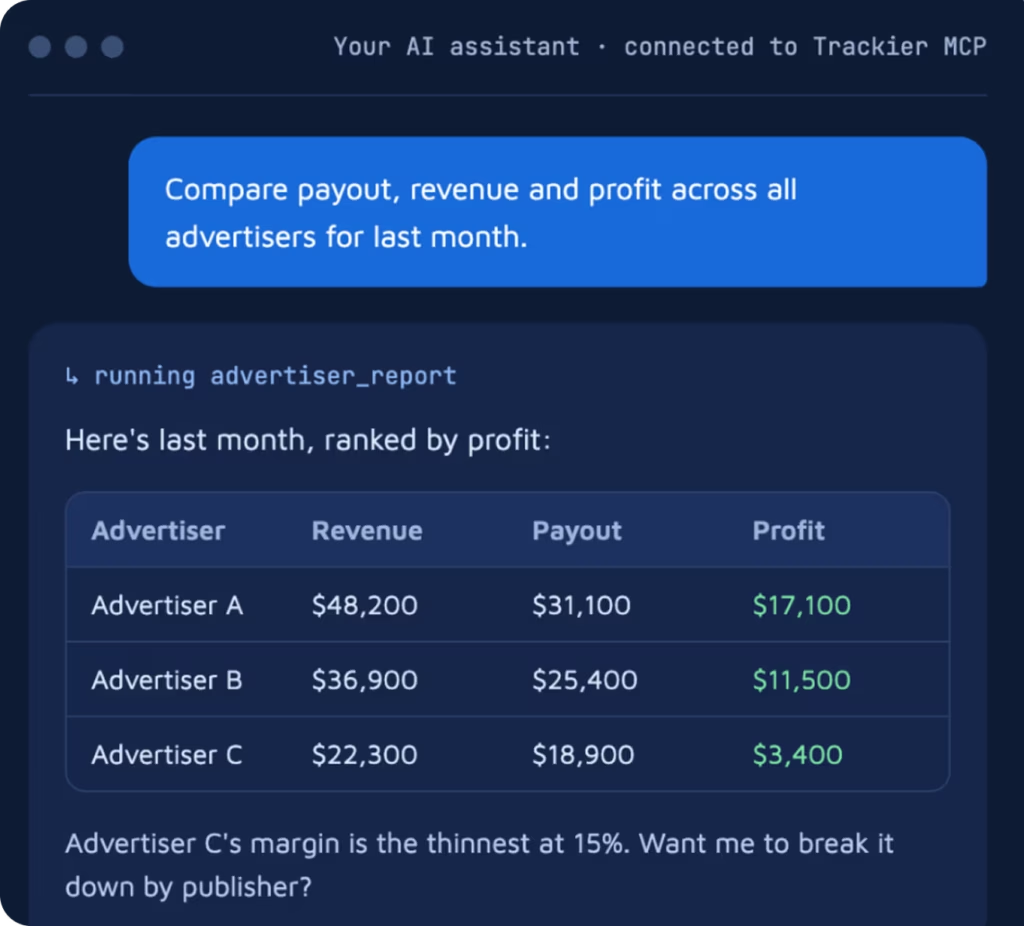
"Compare payout, revenue and profit across all advertisers for last month."
"Which campaigns made the most profit this week, and which lost money?"
Campaign Health
"What caps are set on [Campaign], and how close are we to hitting them?"
"What targeting rules apply to [Campaign], by country and device?"
"List the landing pages on [Campaign] and what changed on it recently."
Advertisers and Publishers
"Which publishers drove the most conversions for [Brand] last week?"
"List every active campaign for [Advertiser] with its payout model."
"Pull up publisher #[ID] and summarize how they performed this month."
Create New Campaigns, Built Completely through AI
"Create a new CPA campaign for [Advertiser] pointing to [URL], paying [amount] per approved conversion."
The Trackier MCP can complete required changes within your panel. It can even create a permanent campaign record, your instructions are clear.
The other displayed prompts only look at your data. This one adds a real, live campaign to your panel, and it stays there until someone removes it. Treat it like setting up a campaign by hand and double-check the advertiser, URL and payout before you hit send.
Your Next Report Could Take 10 Seconds, Not an Afternoon
Bring the question that eats up your Monday. We'll answer it live with Trackier MCP, on the AI tool your team already uses and give you a tour of what’s possible.
Who Gets the Most from Trackier MCP?
If your team runs affiliate, partner or performance campaigns on Trackier, the MCP saves time for every role that touches campaign data, across levels and assigned members.
Affiliate Managers
Check publisher performance and caps between calls, without opening five reports.
Ad Networks
Monitor profit across every advertiser and catch weak margins early.
Agencies
Answer client questions on the spot and prep campaign reviews in minutes.
Finance and Leadership
Get revenue, payout and profit numbers directly, in words that make sense.
Advertisers and Brands
See which partners bring real conversions and what each one costs, without waiting on a report.
Media Buyers
Check campaign profit and caps on the go and decide where to push or pull spend faster.
Ad Ops and Operations
Audit caps, targeting, landing pages and recent campaign changes in one question.
Data and BI Analysts
Answer ad hoc requests in seconds and save deep analysis time for the questions that need it.
Stop Pulling Reports. Start Asking Questions.
We'll connect an AI assistant of your choice to the Trackier panel, run the questions your team asks every week and show you how fast AI-driven affiliate performance analysis can be.
See natural reporting on real campaign data.
Get the foundation prompt and setup steps for your AI tool.
Ask our team anything about the Trackier platform.
Watch it Answer your Team's REAL Questions
Pick a time that works for you. We'll tailor the walkthrough to your campaigns and the AI tool you use.
Frequently Asked, Clearly Answered
What is Trackier MCP?
Trackier MCP is a Model Context Protocol server that connects AI assistants such as Claude or ChatGPT to your Trackier account. It allows you to retrieve campaign, affiliate, advertiser, and performance data using natural-language queries without manually navigating reports.
Do I need a developer to use Trackier MCP?
No. Everyday queries do not require coding once the connection is configured. However, the initial local setup for Claude Desktop involves installing Node.js, downloading the Trackier MCP server files, installing dependencies, configuring the server, and adding an API key.
Is an additional subscription required to use Trackier MCP?
No additional subscription is required to use Trackier MCP. However, you still need a Trackier account with API access and an MCP-compatible AI assistant configured to connect to the Trackier MCP server.
What can you do with Trackier MCP?
You can ask questions about your campaign performance, clicks, conversions, advertisers, publishers, payouts, revenue, profit, caps, and targeting. Depending on the available tools, Trackier MCP can retrieve relevant data, compare performance, identify potential issues, and create campaigns when explicitly requested.
Is Trackier MCP read-only, or can it create campaigns?
Trackier MCP is designed primarily for reading and retrieving data from the Trackier platform. Most available tools are read-only, while campaign creation is a write action that runs when explicitly requested. You should confirm the available tools and their permissions before relying on specific actions.
How can you set up Trackier MCP with Claude Desktop?
You need Node.js, Claude Desktop, a Trackier network account with API access, and the Trackier MCP server project files. Then, you have to generate an API key from the Automation module in your Trackier panel, install the server dependencies, configure the server path and API key in Claude Desktop’s claude_desktop_config.json file, and restart Claude Desktop. Once connected, you can verify the setup by asking Claude to list your Trackier advertisers.
How can Trackier MCP help affiliate managers and performance marketing teams save time?
Trackier MCP reduces the time spent manually navigating reports, applying filters, exporting CSV files, and compiling performance data. You can ask questions about clicks, approved conversions, campaign profitability, publisher performance, and advertiser payouts directly through its connected AI assistant.
What should you do if Trackier MCP does not connect or return the expected data?
You should first check that the Trackier API key is correct, active, and copied in full from the Automation module. For a local Claude Desktop setup, verify that Node.js is available, the server files and dependencies are in the correct folder, and the configuration contains the correct absolute paths to the Node.js executable and server.js. After making configuration changes, you should fully quit and restart Claude Desktop.