
As performance marketing operations continue to scale, the volume of campaign data, like clicks, conversions, and user interactions, grows exponentially. Managing this data efficiently is no longer optional; it’s critical for accurate reporting, compliance, and long-term performance analysis.
However, many teams still rely on manual exports or fragmented storage systems, which can lead to delays, data inconsistencies, and operational inefficiencies.
To address this, Trackier’s January 2026 product updates focus on making data handling more automated, secure, and scalable. This month, we’ve introduced: DigitalOcean integration for automated data export
With this enhancement, you can seamlessly export your campaign data, store it securely in the cloud, and access it whenever needed, without manual intervention.
The goal is simple: ensure your data is always organized, accessible, and ready for deeper analysis, so your team can focus on optimization instead of operations.
DigitalOcean Integration for Automated Data Export
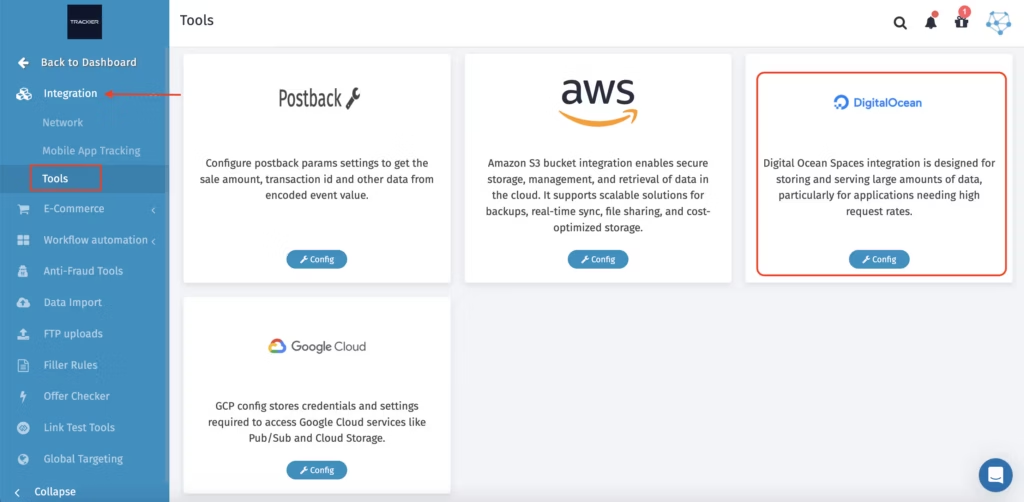
DigitalOcean is a cloud platform that enables businesses to run applications and manage data without dealing with complex infrastructure. It offers scalable storage solutions, making it ideal for handling large volumes of performance marketing data.
With Trackier’s DigitalOcean integration, you can now automatically export click and conversion logs directly to DigitalOcean Spaces. This ensures that all your campaign data is consistently backed up, securely stored, and easily accessible for reporting or advanced analytics.
By eliminating the need for manual exports, this integration reduces operational workload and ensures data reliability across your workflows.
What is New?
- Native integration with DigitalOcean Spaces
- Automatic export of click and conversion data
- Support for CSV and JSON formats
- Configurable export frequency (daily, weekly, or custom)
- Centralized storage for better data organization and access
Why Does This Matter?
As campaigns scale across multiple channels, geographies, and partners, having a reliable data storage and export system becomes essential. Without it, teams often struggle with:
- Delayed reporting
- Data fragmentation across systems
- Limited access to historical performance data
With DigitalOcean integration, you can:
- Eliminate repetitive manual exports and reduce human error
- Ensure consistent and secure data backups
- Access structured campaign data anytime for reporting, audits, or BI tools
This not only improves operational efficiency but also enables faster, data-driven decision-making.
Key Benefits
Here’s how DigitalOcean integration enhances your data workflows by automating exports, improving security, and ensuring scalable storage, helping you manage campaign data efficiently while enabling faster analysis and smarter decisions.
- Automated Data Export – Trackier automatically pushes clicks and conversion logs to your DigitalOcean space, ensuring that your data is always up to date without manual effort.
- Secure Cloud Storage – Your campaign data is stored securely in DigitalOcean, reducing the risk of data loss and ensuring compliance with internal data policies.
- Flexible Data Formats – Export logs in CSV or JSON, making it easier to integrate with dashboards, analytics platforms, or internal reporting systems.
- Custom Export Scheduling – Set export frequency based on your business needs, like daily for regular monitoring, weekly for reporting cycles, and custom intervals for specific workflows.
- Scalable Infrastructure – As your campaign data grows, DigitalOcean scales with you, ensuring uninterrupted storage and performance without additional setup.
How to Set Up DigitalOcean Integration?
Setting up DigitalOcean integration in Trackier is simple and quick. Follow these steps to configure your credentials, choose export preferences, and start automatically exporting your campaign data seamlessly.
Step 1: Access the Integration
- Go to the Dashboard
- Navigate to Automation → Integration
- Click on Tools
- Select DigitalOcean and click Config
Step 2: Configure the Integration
- Enable Export to DigitalOcean Space
- Enter the required details:
- Access Key
- Secret Key
- Bucket/Space Name
- Region
- Select:
- Export frequency
- Data type (Clicks, Conversions, or both)
- Format (CSV or JSON)
Click Submit to complete the setup. Once configured, Trackier will automatically begin exporting data to your selected DigitalOcean space.
Logs and Monitoring
To ensure full transparency and control, Trackier provides detailed logs for this integration:
- Timestamps indicate when data is successfully uploaded
- Log messages highlight actions, updates, or errors
These logs help teams:
- Monitor export activity in real time
- Validate data flow and consistency
- Quickly identify and resolve any issues
What Does This Mean for Trackier Users?
The January 2026 update is designed to make data management more reliable, automated, and scalable for performance marketing teams.
With DigitalOcean integration, you can:
- Automate your data export workflows end-to-end
- Maintain secure and organized storage for all campaign data
- Access clean, structured data whenever needed for reporting or analysis
Eventually, this update reduces the time spent on manual data handling and empowers your team to focus on what truly matters: optimizing campaigns, improving performance, and driving growth at scale.