
Managing multiple affiliate campaigns becomes challenging when publishers are unsure which traffic sources are allowed for each offer. This can lead to mismatched promotions, confusion within the team, and unnecessary back-and-forth between affiliate managers and publishers.
A systematic approach to affiliate campaign settings helps avoid these challenges by establishing clear expectations from the start. With Trackier, affiliate managers can define Allowed Traffic Channels for each campaign, making it easier for publishers to identify offers that match their promotional methods.
In this guide, you’ll learn how to configure affiliate campaign settings in Trackier, create traffic channels, and assign them to campaigns to make your affiliate operations more organized and efficient.
What Is Campaign Management in Affiliate Marketing?
Campaign management is the process of planning, creating, organizing, monitoring, and optimizing marketing campaigns to achieve specific business goals.
In affiliate marketing, it involves managing campaign details, tracking performance, coordinating with publishers, and ensuring promotional activities align with advertiser requirements.
Effective campaign management helps affiliate managers maintain better control over their campaigns while giving publishers the information they need to promote offers correctly.
An important part of this process is configuring affiliate campaign settings, including defining the traffic sources permitted for each campaign.
What Are Allowed Traffic Channels in Trackier?
Allowed Traffic Channels are labels that affiliate managers can create and assign to campaigns in Trackier. These labels indicate the promotional channels permitted for a particular campaign and help publishers understand which offers match their traffic sources.
For example, an advertiser may prefer traffic from social media and email marketing for one campaign while allowing native advertising for another.
Common traffic channels include:
- Social Media: Facebook, Instagram, TikTok, and other social media platforms.
- Email Marketing: Promotional emails and newsletters.
- Native Advertising: Ads designed to match the surrounding content.
- SMS Marketing: Promotional messages sent through text.
- Push Notifications: Browser or mobile push notifications.
By assigning relevant channels, affiliate managers can communicate campaign requirements more clearly and help publishers select suitable offers.
How to Add Traffic Channels in Trackier
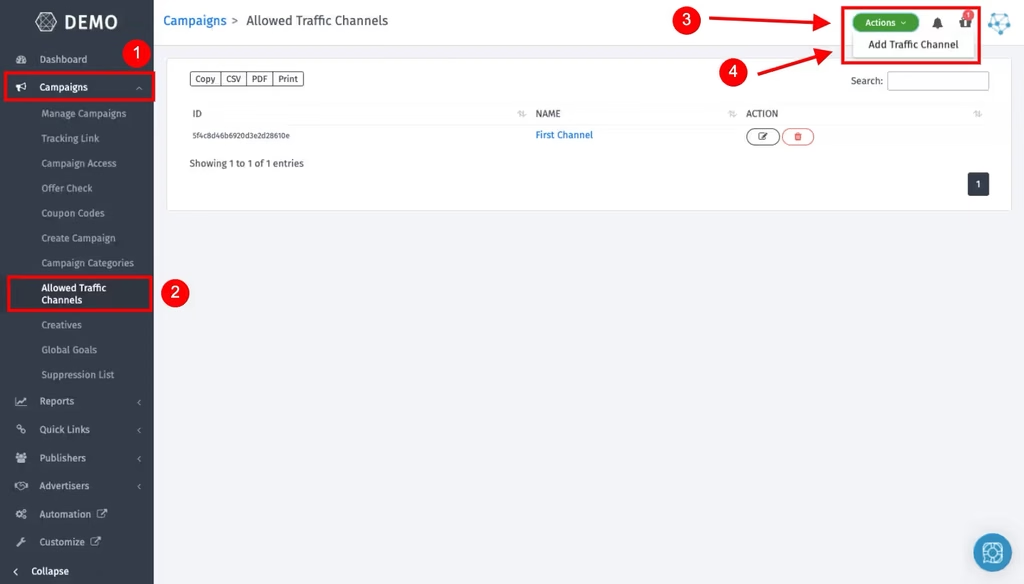
Before assigning a traffic channel to a campaign, you need to create it in your Trackier panel. This is one of the first steps in configuring your affiliate campaign settings.
Follow these steps:
- Log in to your Trackier panel.
- Navigate to the Campaigns section.
- Select Add Traffic Channel.
- Click the Actions button.
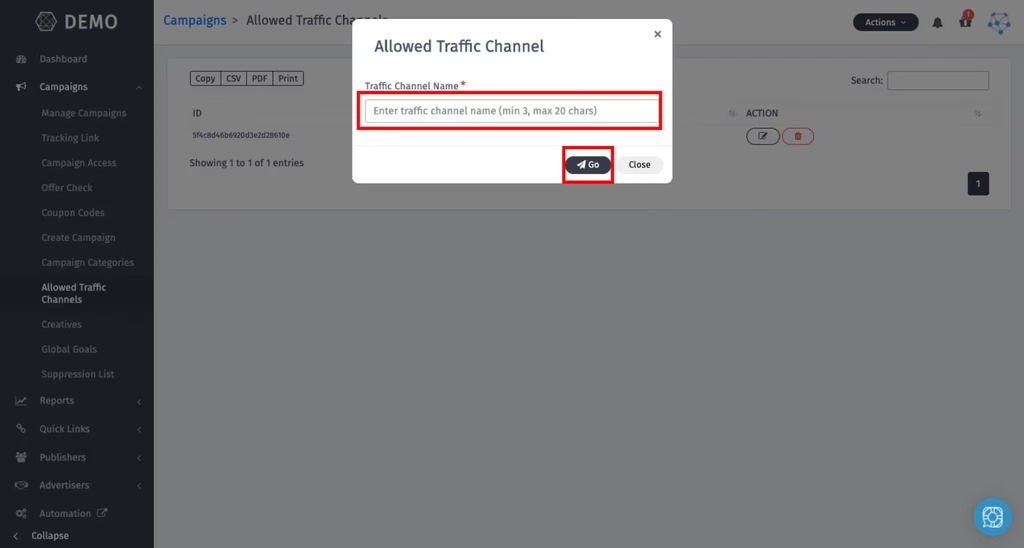
- Enter the traffic channel name in the pop-up window, such as Email Marketing or Push Notifications.
- Click Go to save the channel.
Once saved, the traffic channel becomes available for assignment to campaigns in your panel.
How to Assign Traffic Channels to Campaigns
After creating your traffic channels, you can assign them to new or existing campaigns through the campaign settings.
1. For New Campaigns
When creating a new campaign in Trackier:
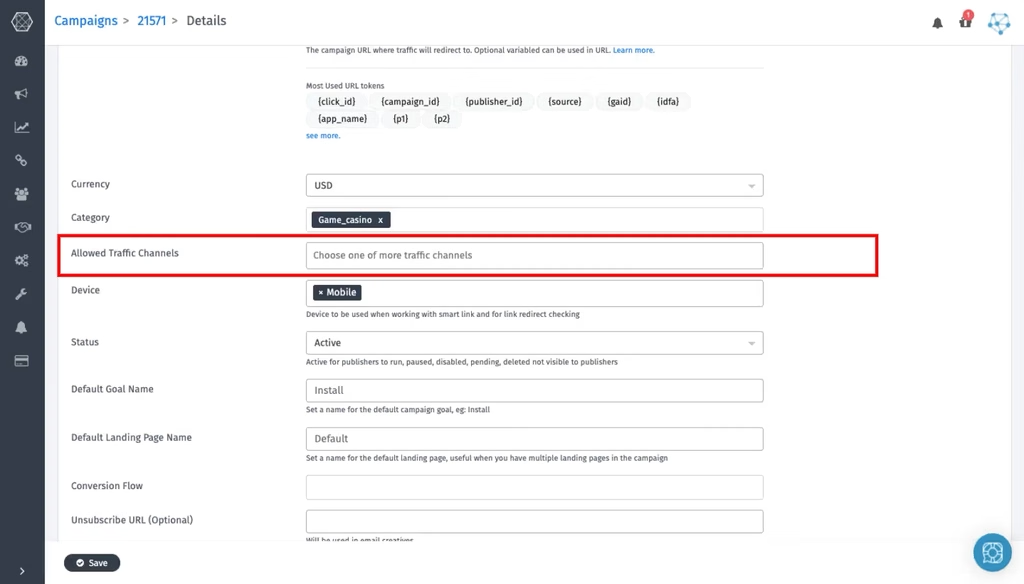
- Open the campaign creation section.
- Locate the Allowed Traffic Channels field.
- Select the relevant traffic channels from the dropdown.
- Complete the remaining campaign details and save the campaign.
The selected channels will be associated with the campaign, helping publishers understand which promotional methods are permitted.
2. For Existing Campaigns
If a campaign is already active, you can update its traffic channel settings without creating a new campaign.
- Navigate to Campaigns → Manage Campaigns.
- Open the campaign you want to update.
- Click Edit.
- Find the Allowed Traffic Channels field.
- Select the appropriate channels.
- Save your changes.
Regularly reviewing these affiliate campaign settings helps keep campaign information updated as advertiser requirements and promotional strategies change.
How Do Publishers View Allowed Traffic Channels?
Once traffic channels are assigned, publishers can log in to their Trackier panel and explore available campaigns.
The assigned channels are displayed in the publisher interface, allowing publishers to identify offers that align with their promotional methods.
For example, a publisher primarily working with email marketing can look for campaigns that list email marketing as an allowed traffic channel.
This visibility helps publishers make informed campaign selections and reduces confusion about promotional requirements.
Why Are Affiliate Campaign Settings Important?
Well-organized affiliate campaign settings can improve communication and coordination across your affiliate program.
1. Better Campaign Organization
Categorizing campaigns by permitted traffic channels makes it easier for publishers to identify relevant offers and understand their requirements.
2. Fewer Mismatched Promotions
Clear channel labels help publishers understand campaign requirements before starting promotional activities, reducing unnecessary clarification and confusion.
3. Improved Publisher Experience
Publishers can identify campaigns that align with their existing traffic sources instead of spending time evaluating unsuitable offers.
4. Better Alignment With Advertisers
Clearly communicating permitted promotional channels helps affiliate managers maintain alignment with advertiser expectations and campaign requirements.
5. More Efficient Campaign Management
Standardized channel labels provide a consistent way to organize campaign information and coordinate with multiple publishers.
Allowed Traffic Channels vs. Traffic Restrictions
Allowed Traffic Channels in Trackier are informational labels. They help publishers understand which traffic sources are permitted, but they do not technically block traffic from other sources.
If you need to enforce traffic restrictions, use Campaign Targeting rules instead.
Understanding this distinction is essential for effective affiliate campaign settings. Informational labels improve communication, while targeting rules help enforce specific campaign requirements.
Conclusion
Effective affiliate campaign settings require clear communication, organized campaign information, and alignment between advertisers and publishers.
Trackier’s Allowed Traffic Channels feature helps affiliate managers communicate permitted promotional channels, improve campaign discoverability, and reduce confusion during campaign selection.
By creating relevant traffic channels and assigning them to the appropriate campaigns, you can organize your affiliate campaign settings, provide publishers with clearer guidance, and build a more efficient affiliate campaign management workflow.
For additional assistance, contact the Trackier support team at support@trackier.com or use the in-platform chat feature.
